
| 일 | 월 | 화 | 수 | 목 | 금 | 토 |
|---|---|---|---|---|---|---|
| 1 | 2 | 3 | 4 | |||
| 5 | 6 | 7 | 8 | 9 | 10 | 11 |
| 12 | 13 | 14 | 15 | 16 | 17 | 18 |
| 19 | 20 | 21 | 22 | 23 | 24 | 25 |
| 26 | 27 | 28 | 29 | 30 | 31 |
- JavaScript 내장객체
- javaprogramming
- sql
- web
- 오라클
- springaop
- 스프링
- Oracle
- CSS
- maven
- HTML
- TIL
- mybatis
- 프로그레시브웹앱
- progressive web app
- 국비지원
- 자바프로그래밍
- sqldeveloper
- PWA
- 서브쿼리
- js
- SpringMVC
- 메이븐
- 자바스크립트
- framework
- javascript
- tdd
- 생활코딩
- 프레임워크
- TodayILearned
- Today
- Total
1cm
자바 프로그래밍_Day_104_Spring DI / AOP 본문
2022. 01. 13
Spring DI : Annotation - 자동으로 빈을 생성하고 주입받는 것을 Annotation을 통해 진행한다.
Spring Annotation 방식
- XML 파일(설정 파일)에는 구동시킬 필수 요소만 작성하고 소스코드에 Annotation으로 표시하여 구동하는 방식
-> 필수요소? : <component-scan>
Spring Annotation 기본 설정 - @Annotation 종류
| Bean 등록 시 사용 | @Component | - 객체(컴포넌트)를 나타내는 일반적인 타입으로 <bean> 태그와 동일한 역할 | |
| @Repository | - 퍼시스턴스(persistence) 레이어, 영속성을 가지는 속성(파일, 데이터베이스)를 가진 클래스 ex) Data Access Object Class |
||
| @Service | - 서비스 레이어, 비즈니스 로직을 가진 클래스 ex) Service Class |
||
| @Controller | - 프레젠테이션 레이어, 웹 애플리케이션에서 View에서 전달된 웹 요청과 응답을 처리하는 클래스 ex) Controller Class |
||
| 의존성 주입 시 사용 | @Autowired | - 정밀한 의존 관계 주입(DI)이 필요한 경우에 유용하다. - @Autowired는 필드 변수, setter 메소드, 생성자, 일반 메소드에 적용 가능하다. - 의존하는 객체를 주입할 때 주로 Type을 이용하게 된다. - @Autowired는 <property>, <constructor-arg> 태그와 동일한 역할을 한다. |
|
| @Qualifier | @Autowired와 함께 쓰이며, 한 프로젝트 내에 @Autowired로 의존성을주입하고자 하는 객체가 여러 개 있을 경우, @Qualifier("name")을 통해원하는 객체를 지정하여 주입할 수 있다. | ||
| @Resource | - 애플리케이션에서 필요로 하는 자원을 자동 연결할 때 사용된다. - @Resource는 프로퍼티, setter 메소드에 적용 가능하다. - 의존하는 객체를 주입할 때 주로 Name을 이용하게 된다. |
||
| @Value | - 단순한 값을 주입할 때 사용되는 어노테이션이다. - @Value("Spring")은 <property .. value="Spring"/>와 동일한 역할을 한다. |
||
* @Repository, @Service, @Controller는 특정한 객체의 역할에 대한 @Component의 구체화 형태이다. (세 개는 MVC관련)
* @Autowired와 @Resource 어노테이션
- 공통점 : @Component로 의존관계를 설정한 객체로부터 의존 관계를 자동으로 주입
- 차이점 : @Autowired는 타입으로, @Resource는 이름으로 연결
* 보통 @Autowired를 많이 씀
Spring Annotation 빈 스캐닝(Bean Scanning)
<context:component-scan> 태그
- @Component를 통해 자동으로 Bean을 등록하고, @Autowired로 의존 관계를 주입받는 어노테이션을 클래스에서 선언하여 사용했을 경우에는 해당 클래스가 위치한 특정 패키지를 Scan하기 위한 설정을 XML에 해주어야 한다. 이 때 사용하는 태그임
- 예시 : <context:component-scan base-package="com.kh.spring" />
> <context:include-filter>태그와 <context:exclude-filter> 태그를 같이 사용하면 자동 스캔 대상에 포함시킬 클래스와 포함시키지 않을 클래스를 구체적으로 명시할 수 있다. (잘 안씀)
빈 스캐닝(Bean Scanning)
- Bean으로 사용될 클래스에 특별한 어노테이션(Annotation)을 부여하고 Spring 컨테이너가 이를 통해 자동으로 Bean을 등록하는 방식을 빈 스캐닝을 통한 자동 인식 Bean 등록 기능이라고 한다.
- 장점 : 어노테이션을 부여하고 자동 스캔으로 빈을 등록하면 XML 문서 생성과 관리에 따른 수고를 덜어주고 개발 속도를 향상 시킬 수 있다.
: 개발자 간 XML 설정 파일의 충돌을 최소화 할 수 있다. (내가 만든 클래스에 어노테이션만 붙여주면 되니까)
- 단점 : 애플리케이션에 등록될 Bean이 어떤 것들이 있고, Bean들 간의 의존 관계가 어떻게 되는지를 한 눈에 파악할 수 없다.
시나리오
이전 시간까지 캐릭터 / 무기(종류별) / 공격별 클래스들을 만들어 줬다.
테스트
테스트에서 스프링 기능을 사용할 수 있게끔 확장해주는 어노테이션 : ExtendWith
package com.kh.di.character;

import org.junit.jupiter.api.Disabled;
import org.junit.jupiter.api.Test;
import org.junit.jupiter.api.extension.ExtendWith;
import org.springframework.test.context.ContextConfiguration;
import org.springframework.test.context.junit.jupiter.SpringExtension;

@ExtendWith(SpringExtension.class)
// 설정파일 지정
@ContextConfiguration(locations = "classpath:spring/root-context.xml")
class CharacterTest {

	@Test
	@Disabled
	public void test() {
	}

	@Test
	public void create() {
	}

}
테스트 통과시 : SpringExtension에서 ContextConfiguration에 지정해놓은 설정 파일(root-context.xml)을 가져다가 문제없이 애플리케이션 컨텍스트를 만들어 줬다는 뜻으로 보면 된다.
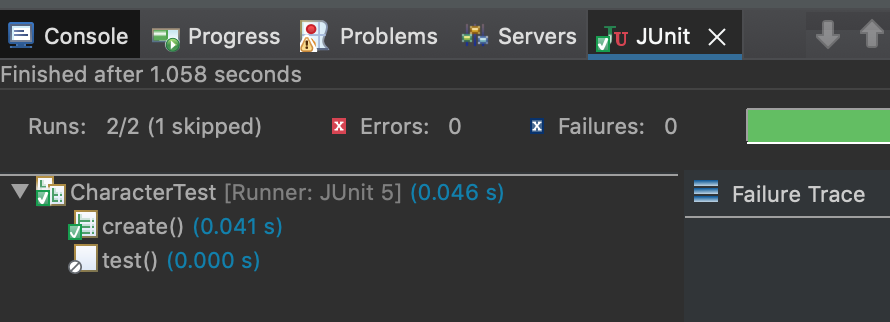

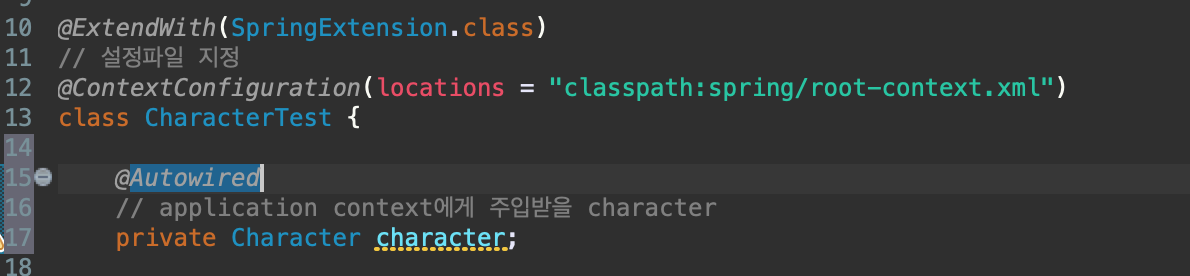
기본적으로 주입되어야 할 bean이 application context에 존재하지 않으면 예외가 발생함
-> 예외 안나게 하려면? : required 속성을 false로 해서 넣어주면 된다. -> character대신 null이 주입이 될 것임.
package com.kh.di.character;

import static org.assertj.core.api.Assertions.assertThat;

import org.junit.jupiter.api.Disabled;
import org.junit.jupiter.api.Test;
import org.junit.jupiter.api.extension.ExtendWith;
import org.springframework.beans.factory.annotation.Autowired;
import org.springframework.test.context.ContextConfiguration;
import org.springframework.test.context.junit.jupiter.SpringExtension;

@ExtendWith(SpringExtension.class)
// 설정파일 지정
@ContextConfiguration(locations = "classpath:spring/root-context.xml")
class CharacterTest {

	// required 속성은 bean 주입이 필수로 진행되어야 하는 지 설정하는 옵션이다.
	// required가 true일 경우 주입해야 되는 bean이 application context에 존재하지 않으면 Exception이 발생한다. (default)
	// required가 false일 경우 주입해야 되는 bean이 application context에 존재하지 않으면 null을 주입한다.
	@Autowired(required = false)
	// application context에게 주입받을 character
	private Character character;

	@Test
	@Disabled
	public void test() {
	}

	@Test
	public void create() {
		assertThat(character).isNull();
	}
}
assertThat -> isNotNull로 했을 때 테스트가 통과될 수 있게 하기
-> annotation을 통해 bean을 등록
package com.kh.di.character;

import org.springframework.stereotype.Component;

import com.kh.di.weapon.Weapon;

import lombok.AllArgsConstructor;
import lombok.Data;
import lombok.NoArgsConstructor;

@Data
// application context가 해당하는 클래스로 객체(bean)를 만들어서 application context에 보관한다.
@Component
public class Character {
	private String name;

	private int level;

	// 인터페이스
	private Weapon weapon;
}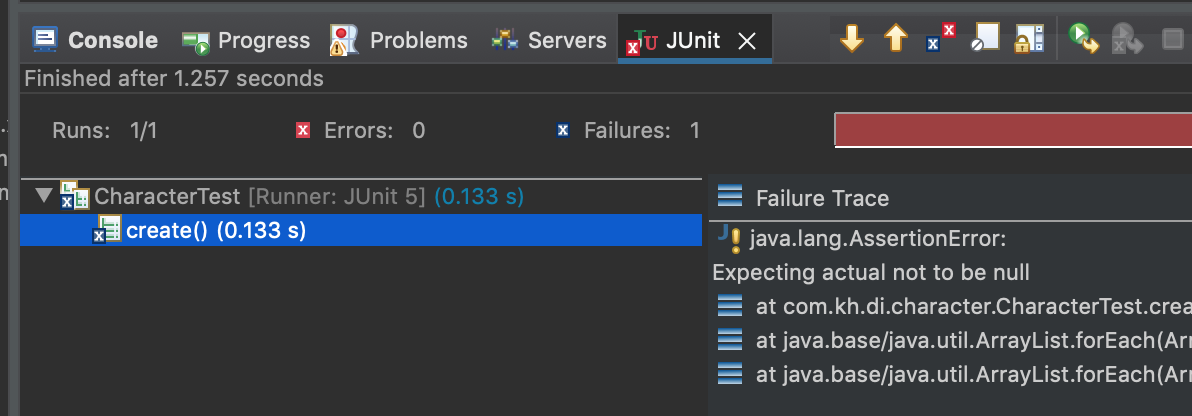
테스트 실행 시 에러 발생 (null) -> application context가 모든 패키지를 찾으면서 @Component를 찾아주지 않는다. -> @Component가 클래스에 붙어있는지 확인 후 bean을 만들라고 하는 최소한의 설정을 설정파일에 등록해줘야 한다. -> Component-scan 필요!
<?xml version="1.0" encoding="UTF-8"?>
<beans xmlns="http://www.springframework.org/schema/beans"
	xmlns:xsi="http://www.w3.org/2001/XMLSchema-instance"
	xmlns:c="http://www.springframework.org/schema/c"
   	xmlns:p="http://www.springframework.org/schema/p"
	xmlns:context="http://www.springframework.org/schema/context"
  	xsi:schemaLocation="http://www.springframework.org/schema/beans http://www.springframework.org/schema/beans/spring-beans.xsd
    	http://www.springframework.org/schema/context http://www.springframework.org/schema/context/spring-context.xsd">

	<!-- Root Context: defines shared resources visible to all other web components -->

	<!-- 다른 설정 파일을 가져오기 위해 사용되는 태그 -->
	<import resource="owner-context.xml" />
	<import resource="pet-context.xml" />

</beans>
-> namespace, 스키마 정보를 추가해줘야 Component-scan을 사용할 수 있다.
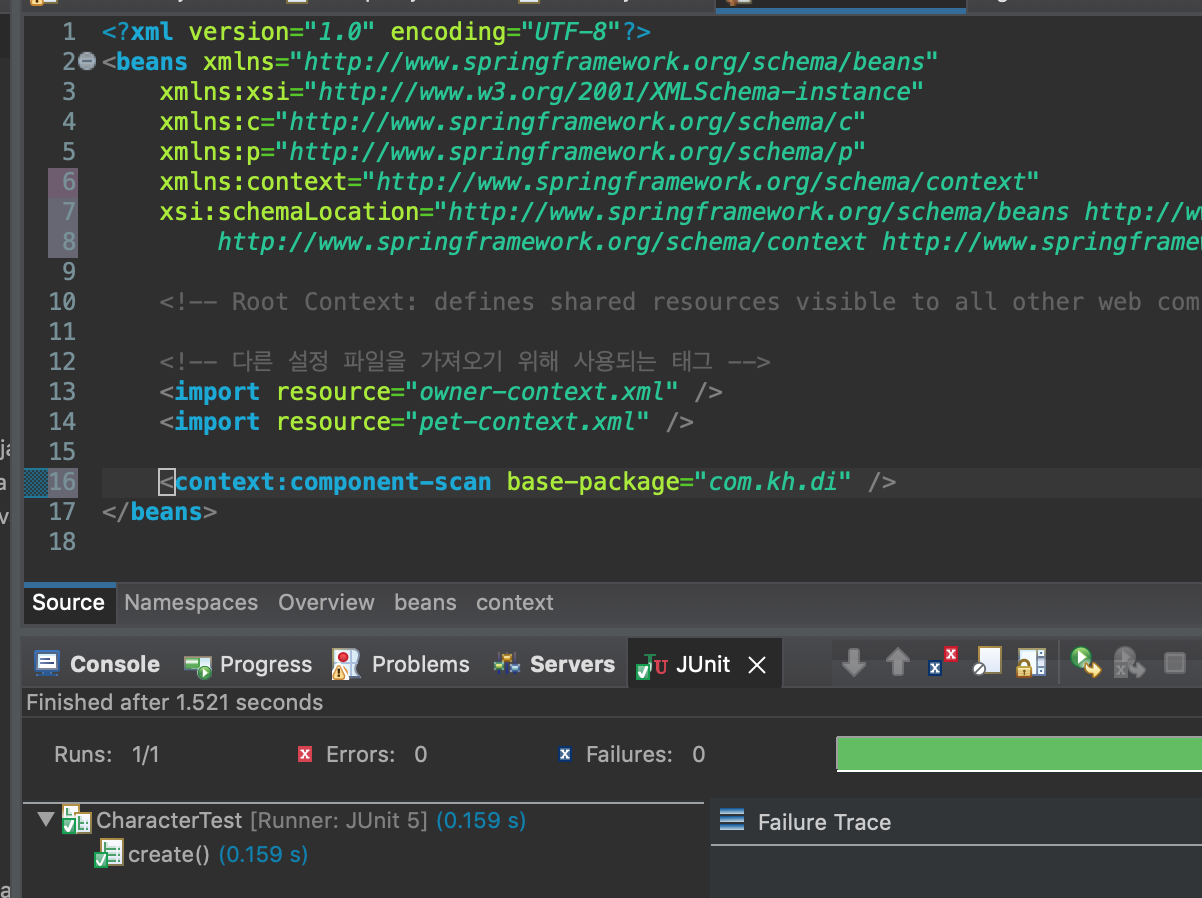
component-scan을 추가해준 뒤 테스트를 진행 시 통과하는 것을 확인할 수 있다. -> 테스트가 성공했다는 건? application context에 character타입에 bean이 존재한다는 뜻 : 클래스에 @Component만 붙여주면 스프링한테 bean으로 만들어줘야 한다고 알려주는 역할을 한다. -> @Component만 넣는 것이 아닌 설정파일에 component-scan 태그도 같이 넣어줘야 함
다시 CharacterTest로 와서 name, level, weapon이 null인지 검증하는 테스트를 거쳤을 때 통과하지 못한다.
	@Test
	public void create() {
		assertThat(character).isNotNull();
		assertThat(character.getName()).isNotNull();
		assertThat(character.getLevel()).isPositive().isGreaterThan(0);
		assertThat(character.getWeapon()).isNotNull();
	}
왜? : 객체를 만들어 줬지만 값이 초기화가 안된 상태이고, JVM이 자동으로 세팅해준 기본 값이 들어간다. (null, 0, null)
-> 값 주입을 어떻게 해줄 것인가? -> @Value 어노테이션 활용
package com.kh.di.character;

import org.springframework.beans.factory.annotation.Value;
import org.springframework.stereotype.Component;

import com.kh.di.weapon.Weapon;

import lombok.AllArgsConstructor;
import lombok.Data;
import lombok.NoArgsConstructor;

@Data
// application context가 해당하는 클래스로 객체(bean)를 만들어서 application context에 보관한다.
@Component
public class Character {
	// 객체에 값 주입
	@Value("제임스")
	private String name;

	@Value("100")
	private int level;

	// 인터페이스
	private Weapon weapon;
}
Character에 @Value로 값을 주입해준 뒤 테스트를 돌려보면
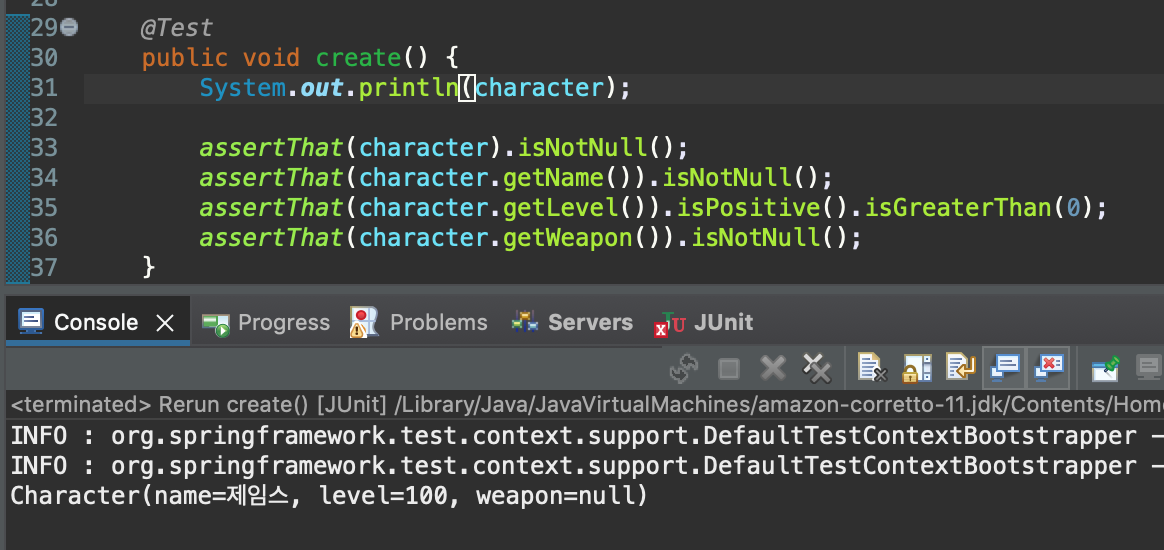
무기에 대한 값은 넣어주지 않았기 때문에 null이 뜨고 주입해준 값대로 들어간 것을 확인할 수 있다.
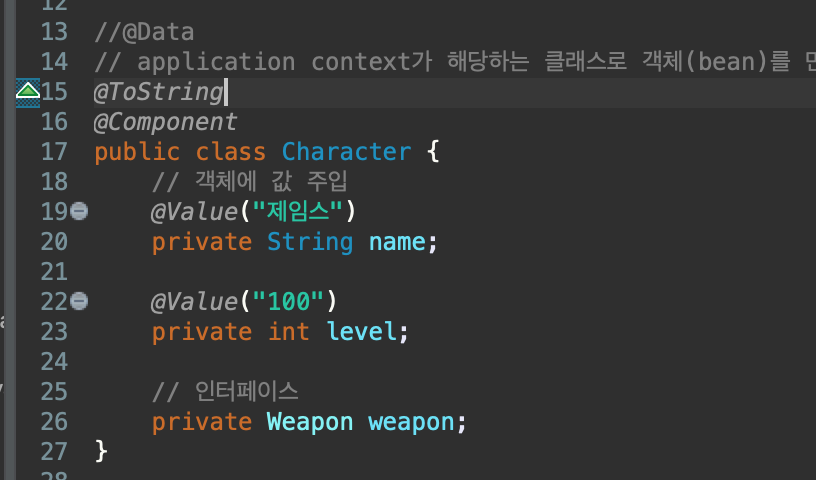
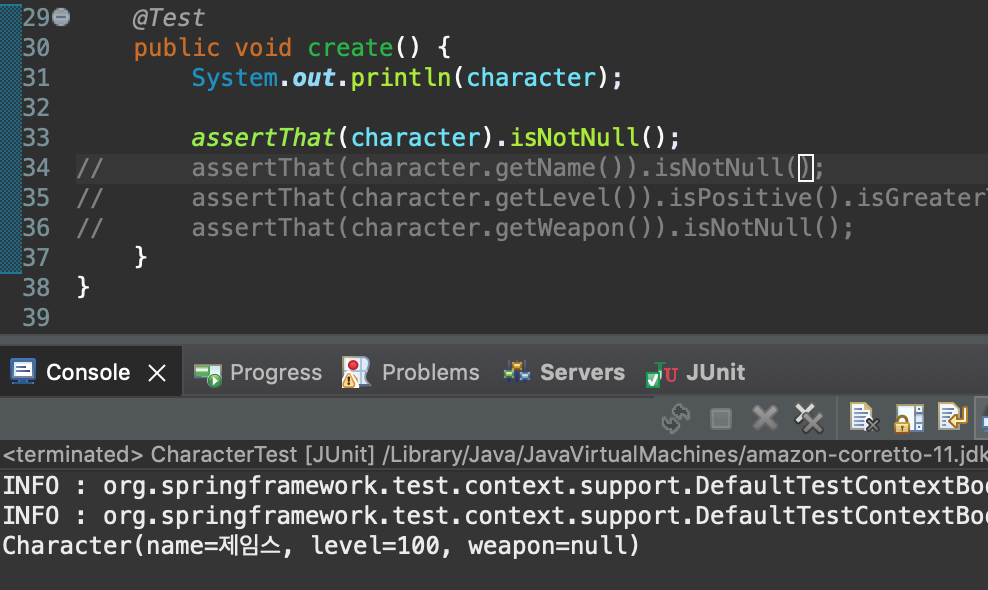
getter, setter 없이 @ToString으로 어노테이션을 설정한 뒤(System.out을 위해 넣어줌) 테스트 했을 때에도 값이 주입되는 것을 확인할 수 있었는데, 이는 필드에 직접 주입함 -> private인데? -> 자바 리플렉션을 통해 가능함.
* 자바 리플렉션? : 자바의 특징 중 하나인데, 구체적인 클래스 타입을 알지 못해도 그 클래스의 메소드, 타입, 변수들에 접근할 수 있도록 해주는 자바 API이다.
weapon에 bean으로 만들어서 값을 주입해줘야 한다. -> @Autowired를 통해서 주입 -> 에러 발생 -> 무기에 대한 bean @Component로 등록필요

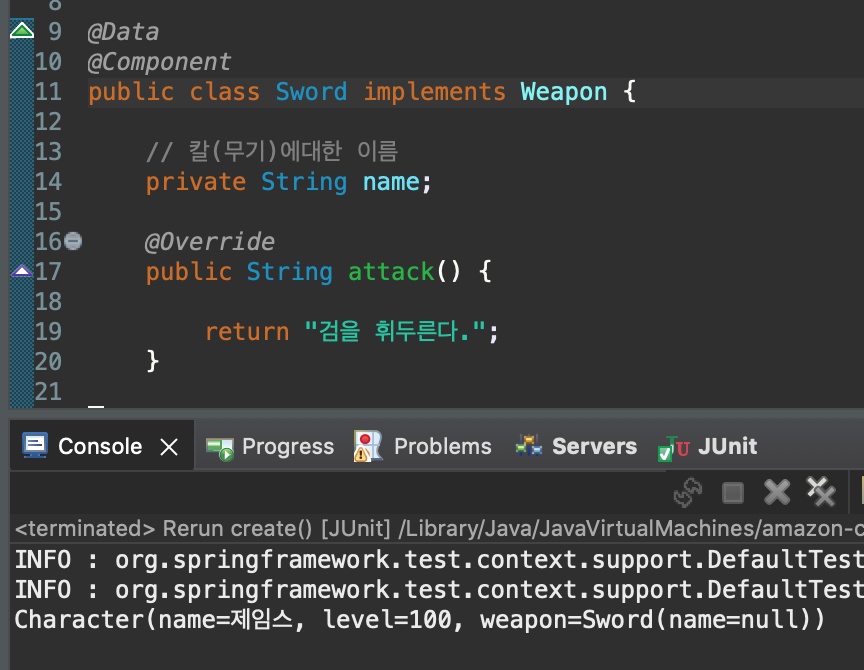
그 다음 테스트 진행 시 null이 아님을 확인할 수 있다. -> name은 null
-> name에 값을 주입해주고 싶을 때 @Value활용
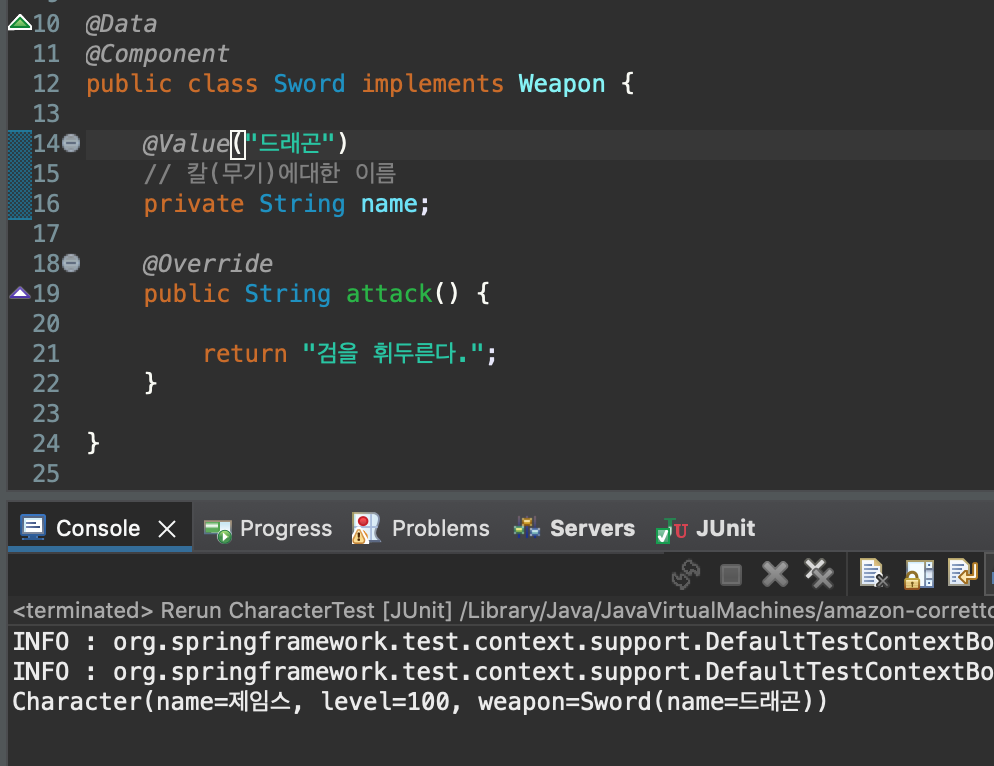
@Value를 통해 값을 주입해준 뒤 테스트를 진행해주면 name에도 값이 들어간 것을 확인할 수 있었다.
Bow.java도 @Value로 값을 넣어주기

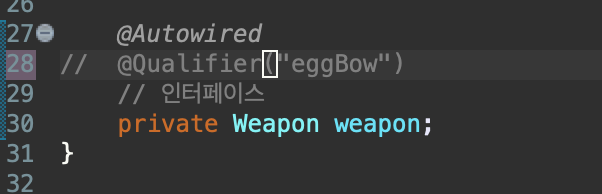
테스트 진행 시 오류 발생 -> bean이 두 개임 -> 명시적으로 @Qulifier를 통해 bow로 지정해줘야 한다.
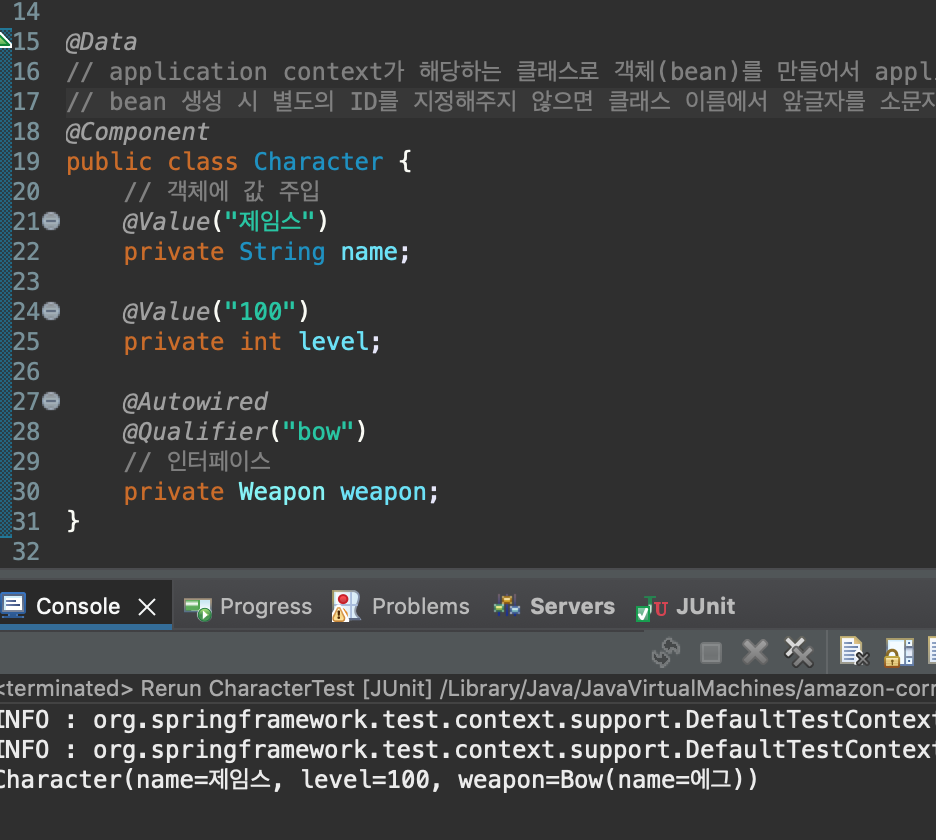
@Qualifier를 통해 직접적으로 지정해준 뒤 테스트 진행하면 무기가 Bow, 에그라는 이름으로 값이 다시 들어간 것을 확인할 수 있음
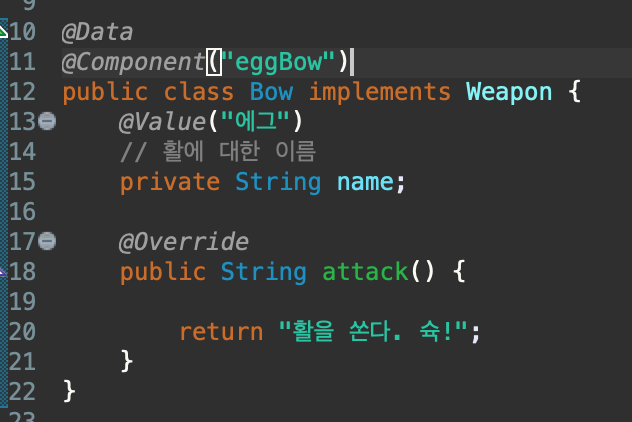

직접적으로 Bow에 Component로 이름을 넣어주고, Character.java에서 이름을 변경해준 뒤 테스트를 진행해도 잘 통과함
만약 bean이 여러 개가 있을 때 기본으로 쓰고 싶은 bean이 있을 경우 @Primary를 붙여줌으로써 기본 bean으로 지정해줄 수 있다.
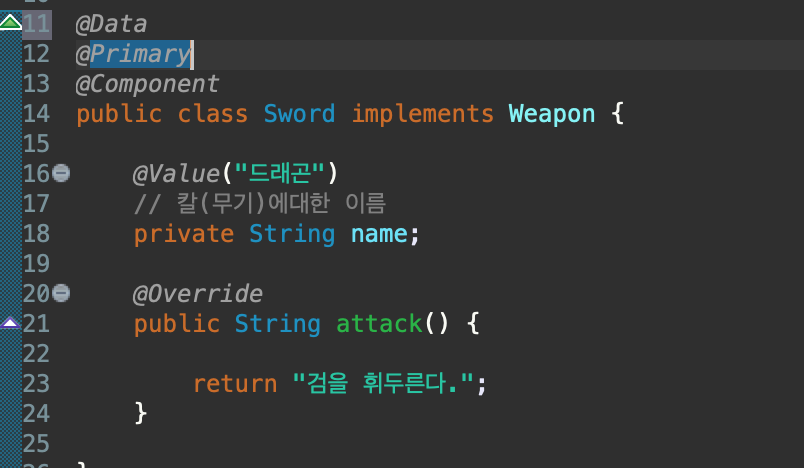
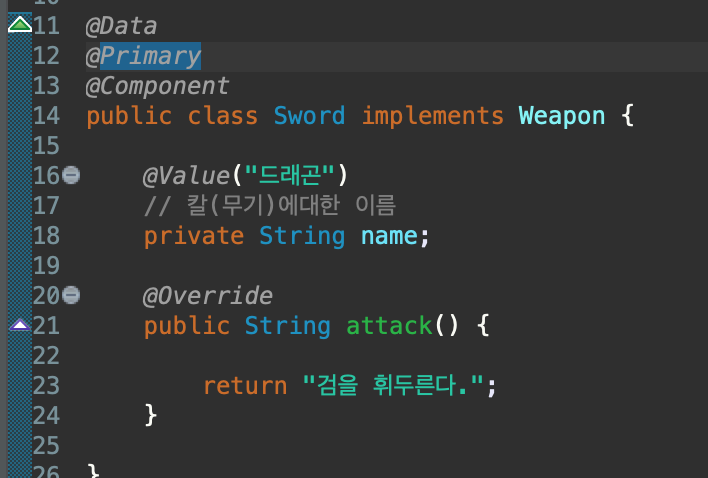
별도의 Qualifier를 지정해 주지 않고, 기본 bean으로 설정하고자 하는 클래스에 가서 @Primary를 붙여 주면, Primary가 붙어있는 Component가 주입이 될 것이다.
-> @Primary 어노테이션은 메서드, 클래스 둘 다 사용이 가능하다.

만약 설정 파일을 자바로 바꾼다면?
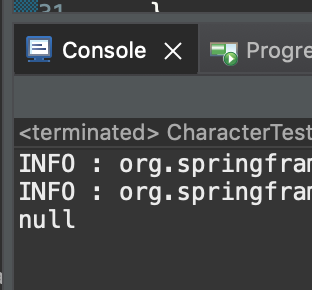
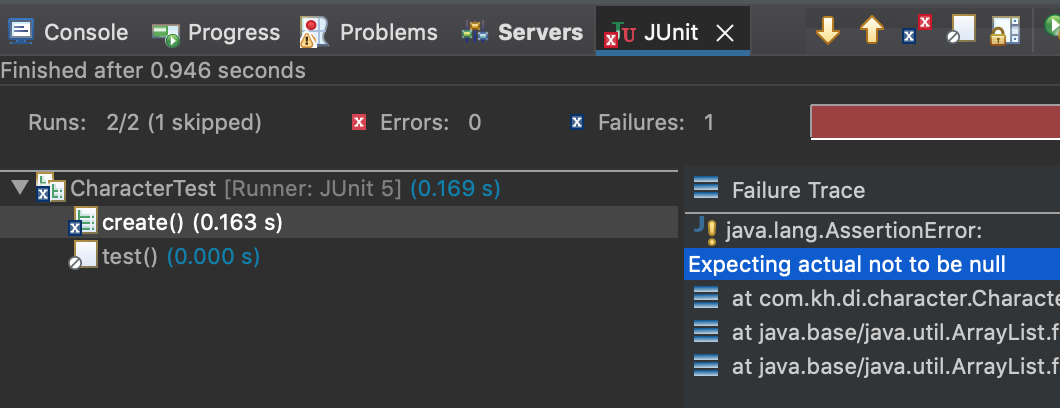
null이 나온다. -> character라는 bean이 없고, 어노테이션을 붙여줬지만 bean으로 생성이 되지 않음
-> 자바config에는 component-scan이라는 태그를 활성화하는 속성이 없기 때문

@ComponentScan("베이스 패키지 지정") -> RootConfig에 추가 해줬다.
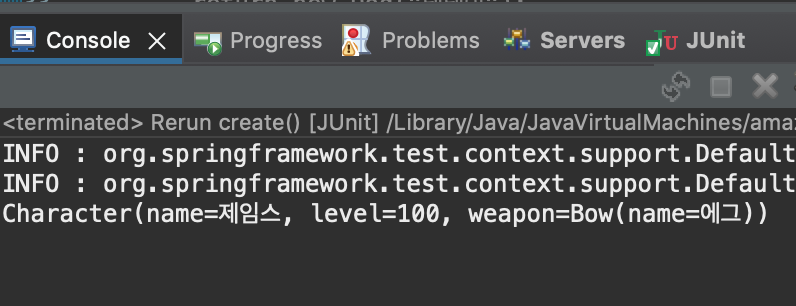
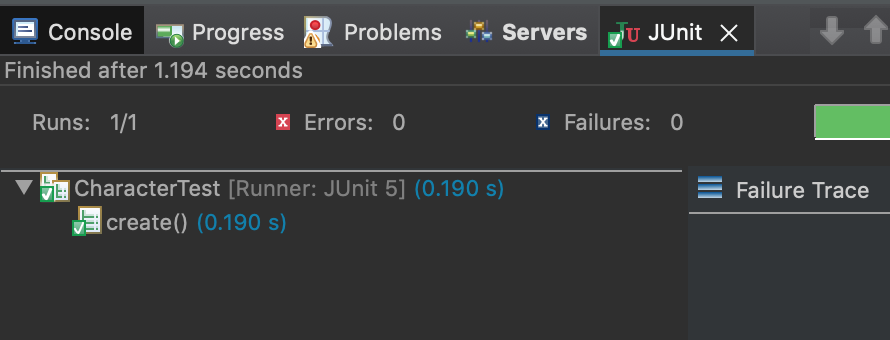
그리고 나서 다시 테스트 진행 시 통과함
- 원하는 시점에 property에 있는 값을 가지고 와서 @Value를 통해 필드에 세팅을 해줄 수 있게 하는 실습
(하드코딩 안하고 설정하는 방법)
properties 생성
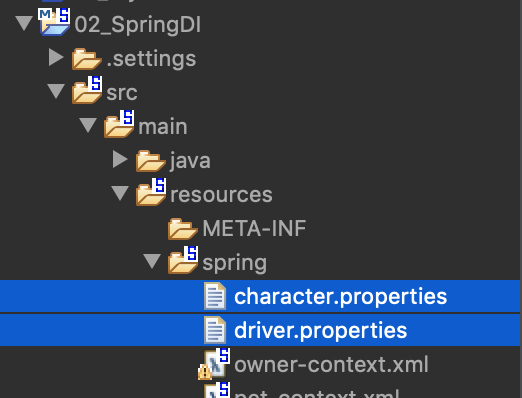

character.properties에 이름, 레벨 작성 해줌 -> Character의 Value 어노테이션을 통해 값을 주입시켜줄 것이다.
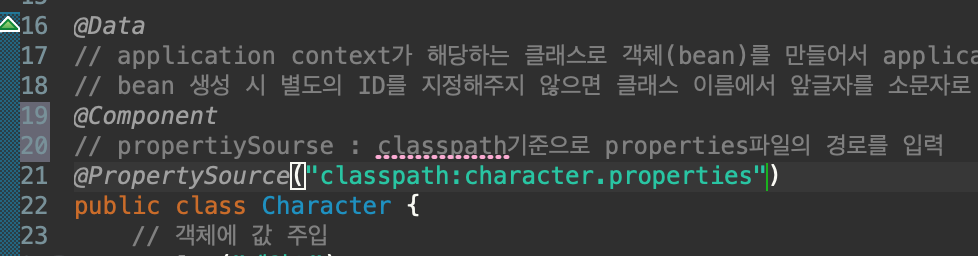
Character.java에서 @PropertySource를 통해 주입하고자 하는 property의 경로를 입력해주면 해당하는 property의 값을 불러올 수 있다.

character.properties의 name, level을 입력해줬고, 이 값을 불러올 수 있는 방법은 두 가지.
1. Environment객체 사용
public Character(Environment env) {
    this.name = env.getProperty("character.name");
    this.level = Integer.parseInt(env.getProperty("character.level"));
}
그리고 test를 실행시키면

getProperty를 통해 성공적으로 불러옴
왜 이게 되지? -> 생성자는 1개있음 (Character(Environment env))

-> Character라는 객체를 만들기 위해서는 생성자를 타야함. -> 이 생성자는 Environment 매개값이 있음 -> Environment객체를 주입해주기 위해서 내가 가지고 있는 bean인지 확인 후 넣어주게 됨 (@Autowired 생략이 되어있다고 보면 됨 -> 필드단에서도 주입받을 수 있다.)
* Environment는 내장 bean이라고 생각하면 됨
package com.kh.di.character;

import org.springframework.beans.factory.annotation.Autowired;
import org.springframework.beans.factory.annotation.Qualifier;
import org.springframework.beans.factory.annotation.Value;
import org.springframework.context.annotation.PropertySource;
import org.springframework.core.env.Environment;
import org.springframework.stereotype.Component;

import com.kh.di.weapon.Weapon;

import lombok.Data;

@Data
// application context가 해당하는 클래스로 객체(bean)를 만들어서 application context에 보관한다.
// bean 생성 시 별도의 ID를 지정해주지 않으면 클래스 이름에서 앞글자를 소문자로 바꾼 값을 ID를 갖는다. (character)
@Component
// propertiySourse : classpath기준으로 properties파일의 경로를 입력해서 값을 읽어오는 방법
// 1. Environment 객체 사용
@PropertySource("classpath:character.properties")
public class Character {

	// 객체에 값 주입
//	@Value("제임스")
	private String name;

//	@Value("100")
	private int level;

	@Autowired
	@Qualifier("eggBow")
	// 인터페이스
	private Weapon weapon;

	public Character(/*@Autowired*/ Environment env) {
		this.name = env.getProperty("character.name");
		this.level = Integer.parseInt(env.getProperty("character.level"));
	}
}
Environment라는 매개값은 Spring Application context가 주입해줌. -> 왜? 해당 클래스를 Application context가 bean으로 만들어주기 때문
2. Spring property place holder사용하는 방법
package com.kh.di.character;

import org.springframework.beans.factory.annotation.Autowired;
import org.springframework.beans.factory.annotation.Qualifier;
import org.springframework.beans.factory.annotation.Value;
import org.springframework.context.annotation.PropertySource;
import org.springframework.core.env.Environment;
import org.springframework.stereotype.Component;

import com.kh.di.weapon.Weapon;

import lombok.Data;

@Data
// application context가 해당하는 클래스로 객체(bean)를 만들어서 application context에 보관한다.
// bean 생성 시 별도의 ID를 지정해주지 않으면 클래스 이름에서 앞글자를 소문자로 바꾼 값을 ID를 갖는다. (character)
@Component
// propertiySourse : classpath기준으로 properties파일의 경로를 입력해서 값을 읽어오는 방법
// 1. Environment 객체 사용
// 2. 스프링 프로퍼티 플레이스 홀더 사용
@PropertySource("classpath:character.properties")
public class Character {

	// @Value를 통한 객체에 값 직접적으로 주입
//	@Value("제임스")
	// 스프링 프로퍼티 플레이스 홀더 사용
	@Value("${charater.name}")
	private String name;

//	@Value("100")
	// 스프링 프로퍼티 플레이스 홀더 사용
	@Value("${charater.level}")
	private int level;

	@Autowired
	@Qualifier("eggBow")
	// 인터페이스
	private Weapon weapon;

//	public Character(/*@Autowired*/ Environment env) {
//		this.name = env.getProperty("character.name");
//		this.level = Integer.parseInt(env.getProperty("character.level"));
//	}
}
@Value에 ${키값}(스프링 플레이스 홀더)를 통해 값을 불러오게 했다. (@PropertySource는 꼭 들어가야 함.)
-> 만약 해당하는 key 값이 없다면? -> ${키:기본값}로 값을 넣어줘도 된다.
	// 스프링 프로퍼티 플레이스 홀더 사용
//	@Value("${charater.name}")
	@Value("${charater.name2:훈이}")
	private String name;
만약 무기도 가져오고 싶다면? -> @PropertySource를 Bow.java에 복사 후 -> Environment / 스프링 프로퍼티 플레이스 홀더 사용하여 properties에 있는 값을 가져오게 됨 -> 과정이 좀 복잡함. ex. 100개라면...?

@PropertySource 어노테이션 생략 후 properties의 값을 가져올 수 있는 방법 -> 설정파일에 properties 등록 후 env, 스프링 프로퍼티 플레이스 홀더를 가져오는 방법
- 자바의 RootConfig에서 PropertySourcesPlaceholderConfigurer이라는 bean을 리턴시켜주기

-> XML은 태그로, 자바는 어노테이션 @Bean을 붙여준다.

PropertySourcesPlaceholderConfigurer라는 객체를 bean으로 등록
resource 객체 : 필요한 리소스들을 클래스 패스 기준으로 찾아준다. (파일 기준 시 파일명 명시)
@Bean
public PropertySourcesPlaceholderConfigurer placeholderConfigurer() {
    PropertySourcesPlaceholderConfigurer configurer = new PropertySourcesPlaceholderConfigurer();

    Resource[] resources = new ClassPathResource[] {
            new ClassPathResource("character.properties"),
            new ClassPathResource("driver.properties")
    };

    configurer.setLocations(resources);

    return configurer;
}


테스트도 잘 된다.
property-placeholder를 여러 개 가져오고 싶은 경우 쉼표로 구분해서 붙여주면 된다.
<!--
    베이스 패키지에 지정한 패키지부터 하위 패키지를 뒤지면서 @Component라는 어노테이션이 붙어있으면
    객체로 만들어서 application context에 bean으로 등록해준다.
 -->
<context:component-scan base-package="com.kh.di" />
<context:property-placeholder location="classpath:character.properties,classpath:driver.properties" />
테스트 클래스에서도 원하는 property-placeholder로 값을 가져올 수 있다.
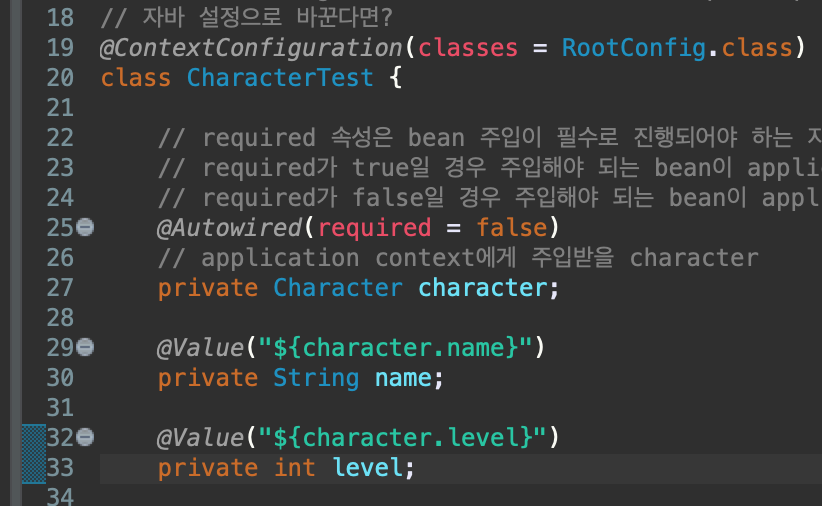
driver.properties에 대한 값도 가져올 수 있음

Spring AOP
Spring AOP란, 관점 지향 프로그래밍(Aspect Oriented Programming)의 약자로 일반적으로 사용하는 클래스(Service, Dao 등)에서 중복되는 공통 코드 부분(commit, rollback, log 처리)을 별도의 영역으로 분리해 내고, 코드가 실행되기 전이나 이 후의 시점에 해당 코드를 붙여 넣음으로써 소스 코드의 중복을 줄이고, 필요할 때마다 가져다 쓸 수 있게 객체화 하는 기술을 말한다.
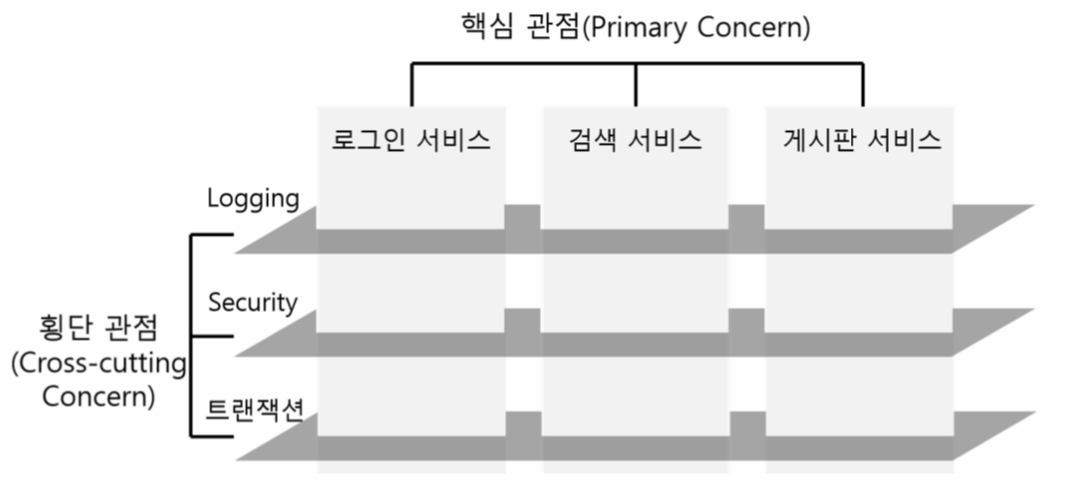
공통 되는 부분(횡단 관심사/횡단 관점)을 따로 빼내어 필요한 시점에 해당 코드를 추가해주는 기술이라고 보면 됨
-> 객체들간의 결합도를 낮춰주는데에 의의가 있다.
Spring AOP의 동작 구조
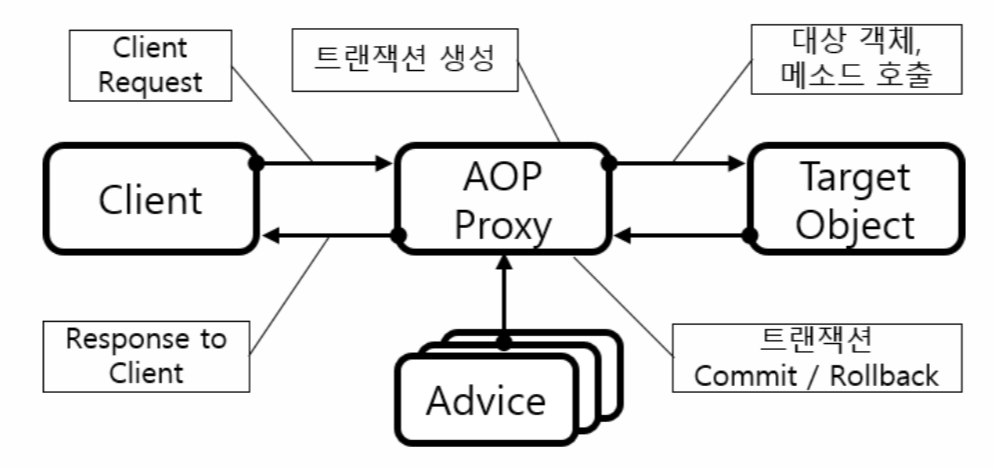
공통되는 부분을 따로 빼내어 작성하는 클래스를 Aspect라고 하고, Advice를 실행하는 시점을 Joinpoint, 그리고 그 시점에 공통 코드를 끼워 넣는 작업을 Weaving 이라고 한다.
Spring AOP 용어
Aspect란?
- Aspect는 부가기능을 정의한 코드인 어드바이스(Advice)와 어드바이스를 어디에 적용하는지를 결정하는 포인트컷(PointCut)을 합친 개념이다. (Advice + PointCut = Aspect)
AOP 개념을 적용하면 핵심기능 코드 사이에 끼어있는 부가기능을 독립적인 요소로 구분해 낼 수 있고, 이렇게 구분된 부가기능 Aspect는 런타임 시에 필요한 위치에 동적으로 참여하게 할 수 있음
- 횡단 관심사/횡단 관점을 분리해서 특정 클래스로 만들어 놓은 것을 Aspect라고 보면 된다.
AOP 핵심 용어
| 용어 | 설명 | |
| Aspect | 여러 객체에 공통으로 적용되는 기능을 분리하여 작성한 클래스 | |
| Joinpoint | 객체(인스턴스)생성 지점, 메소드 호출 시점, 예외 발생 시점 등 특정 작업이 시작되는 시점 | |
| Advice | Joinpoint에 삽입되어 동작될 코드, 메소드 - 실제 Aspect에 적용되는 기능에 해당하는 부분이라고 보면 된다. |
|
| Before Advice | Joinpoint 앞에서 실행 | |
| Around Advice | Joinpoint 앞과 뒤에서 실행 | |
| After Advice | Joinpoint 호출이 리턴되기 직전에 실행 | |
| After Returning Advice | Joinpoint 메소드 호출이 정상적으로 종료된 후에 실행 | |
| After Throwing Advice | 예외가 발생했을 때 실행 | |
| PointCut | 조인 포인트의 부분 집합 / 실제 Advice가 적용되는 부분 | |
| Introduction | 정적인 방식의 AOP 기술 | |
| Weaving | 작성한 Advice(공통 코드)를 핵심 로직 코드에 삽입 | |
| 컴파일 시 위빙 | 컴파일 시 AOP가 적용된 클래스 파일이 새로 생성(AspectJ) | |
| 클래스 로딩 시 위빙 | JVM에서 로딩한 클래스의 바이트 코드를 AOP가 변경하여 사용 | |
| 런타임 시 위빙 | 클래스 정보 자체를 변경하지 않고, 중간에 프록시를 생성하여 경유 (스프링) | |
| Proxy | 대상 객체에 Advice가 적용된 후 생성되는 객체 | |
| Target Object | Advice를 삽입할 대상 객체 | |
Spring AOP 특징 및 구현 방식
1. Spring은 프록시(Proxy) 기반 AOP를 지원한다.
- Spring은 대상 객체(Target Object)에 대한 프록시를 만들어 제공하며, 타겟응ㄹ 감싸는 프록시는 서버 Runtime 시에 생성된다. 이렇게 생성된 프록시는 대상 객체를 호출할 때 먼저 호출 되어 어드바이스의 로직을 처리 후 대상 객체를 호출 함.
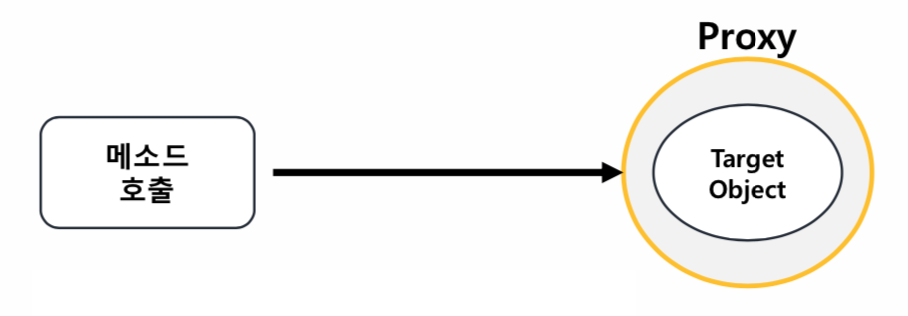
* Proxy : 대상 객체를 직접 접근하지 못하게 '대리인'으로써 요청을 대신 받는 기술 -> 보호막 같은 느낌이라고 보면 될 듯
2. Proxy는 대상 객체의 호출을 가로챈다.(Intercept)
- Proxy는 그 역할에 따라 대상 객체에 대한 호출을 가로챈 다음, Advice 부가기능 로직을 수행하고 난 후에 타겟의 핵심기능 로직을 호출하거나 (전처리 어드바이스), 타겟의 핵심 기능 로직 메소드를 호출한 후에 Advice의 부가기능을 수행함(후처리 어드바이스)
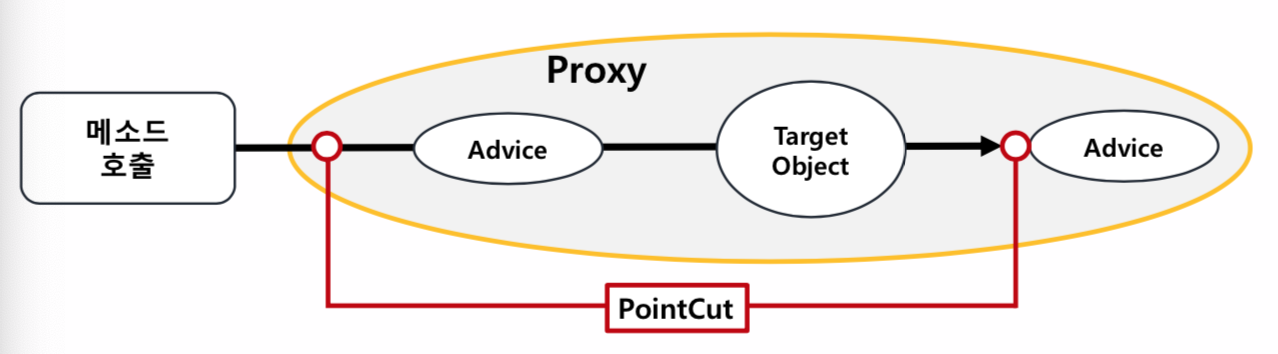
PointCut - 실제로 그 작업을 좁히는 작업
3. Spring AOP는 메소드 조인 포인트만 지원한다.
- Spring은 동적 프록시를 기반으로 AOP를 구현하기 때문에 메소드 조인포인트만 지원함. -> 즉 핵심기능(대상 객체)의 메소드가 호출되는 런타임 시점에만 부가기능(Advice)를 적용할 수 있음
But, AspectJ와 같은 고급 AOP 프레임워크를 사용하면 객체의 생성, 필드 값의 조회와 조작, static 메소드 호출 및 초기화 등의 다양한 작업에 부가기능을 적용할 수 있음
실습
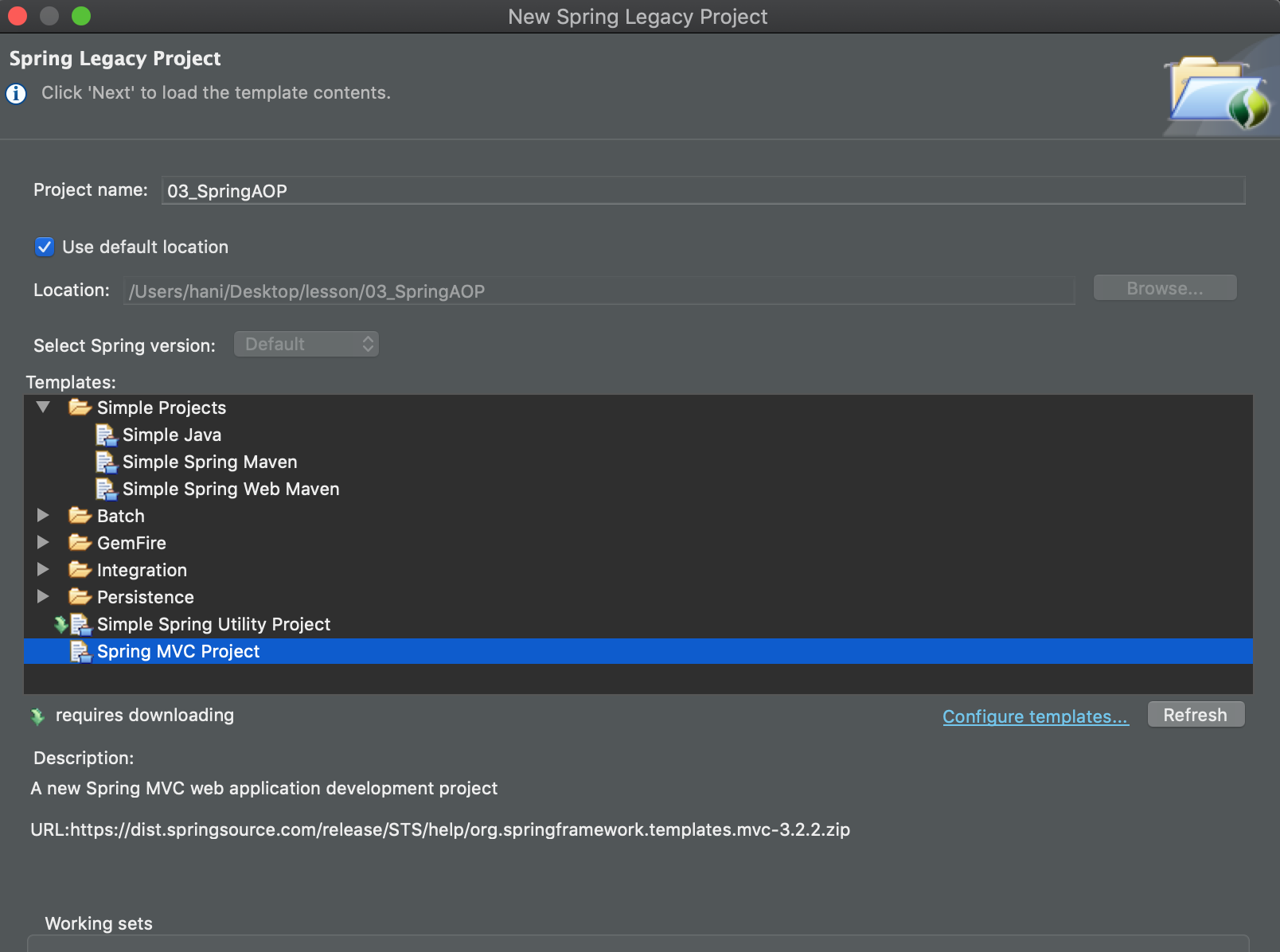
Spring MVC Project
next >
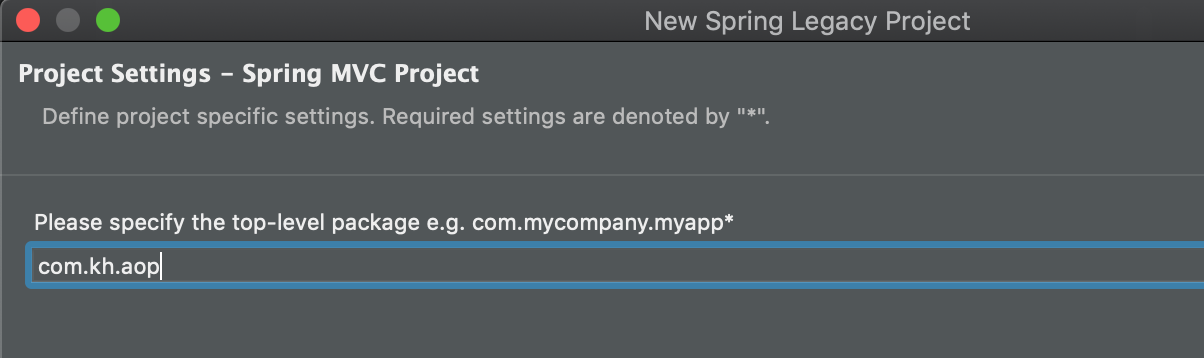
spring lagacy project 생성
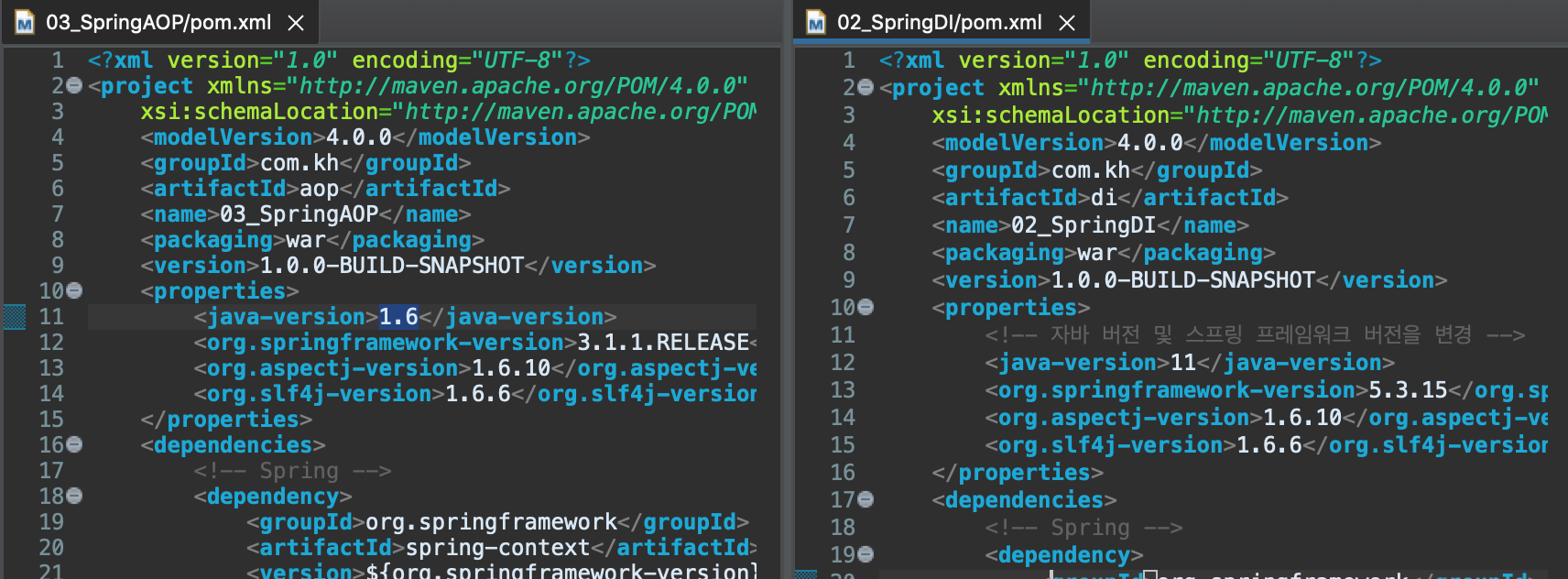
SpringDI에서 했던 설정에 맞춰서 AOP pom.xml도 바꿔준다.
+ web.xml에 있는 filter도 추가해줌
그리고 각각 java파일마다 최소한만 남겨두고 정리해줬다.
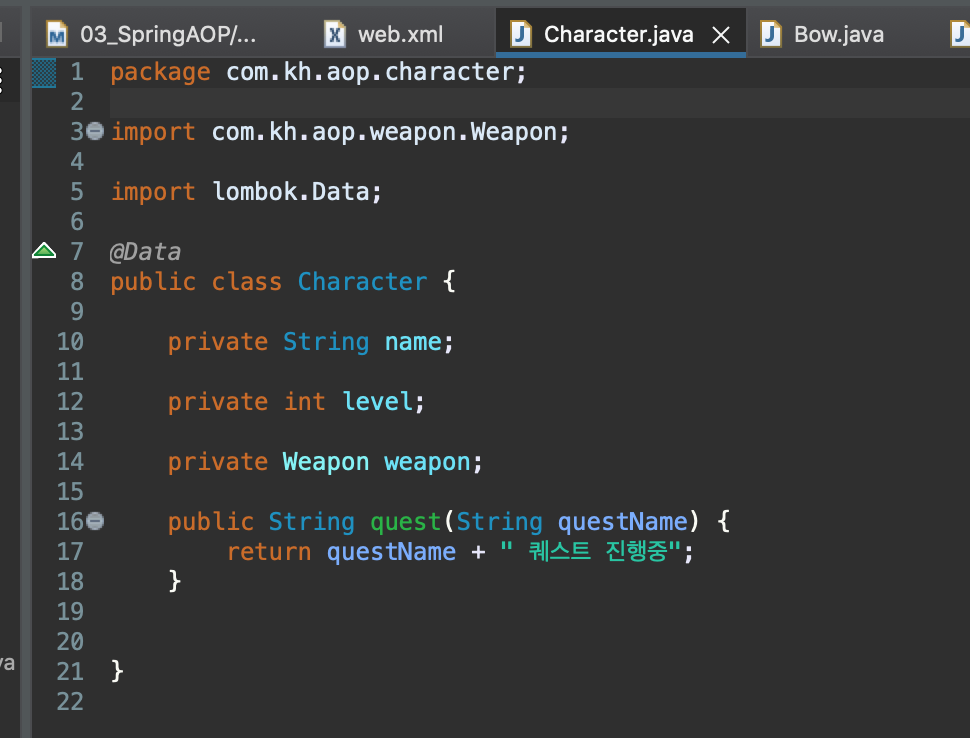


AOP 테스트
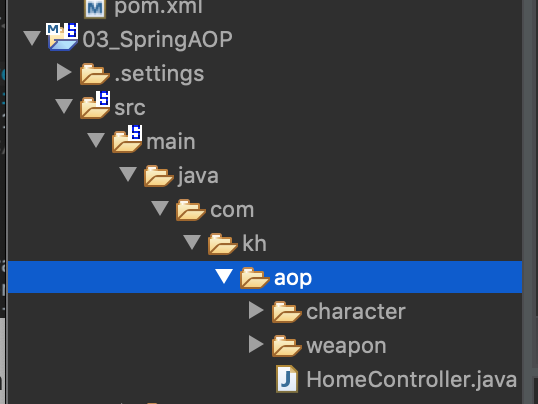
DI에서 작성한 character, weapon을 복사해서 AOP에 붙여넣어준다.
-> 패키지기 변경 되었으니 각각 java 파일 package에 ctrl + 1 -> change to~ 눌러줘서 패키지명 변경해준다.
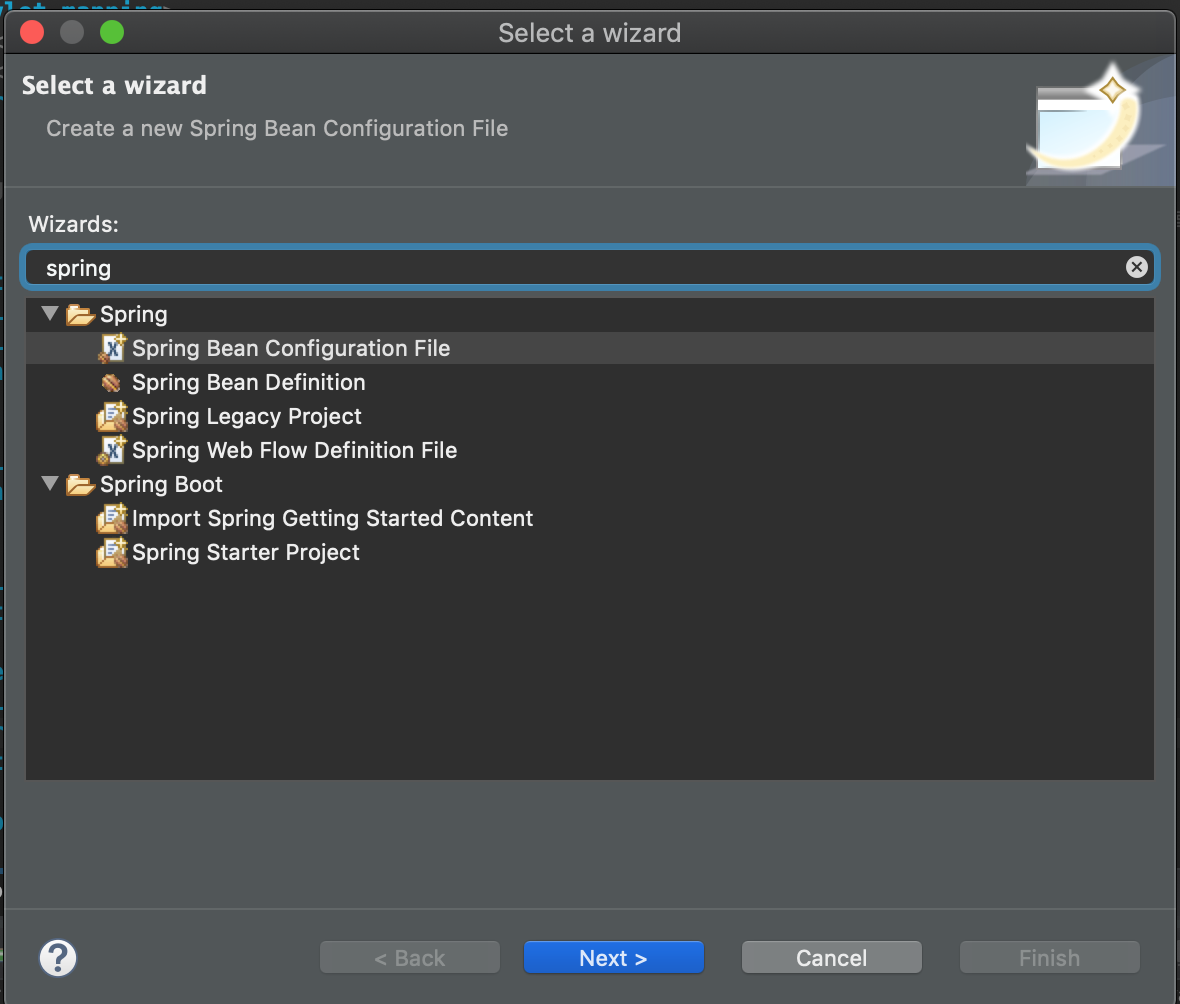
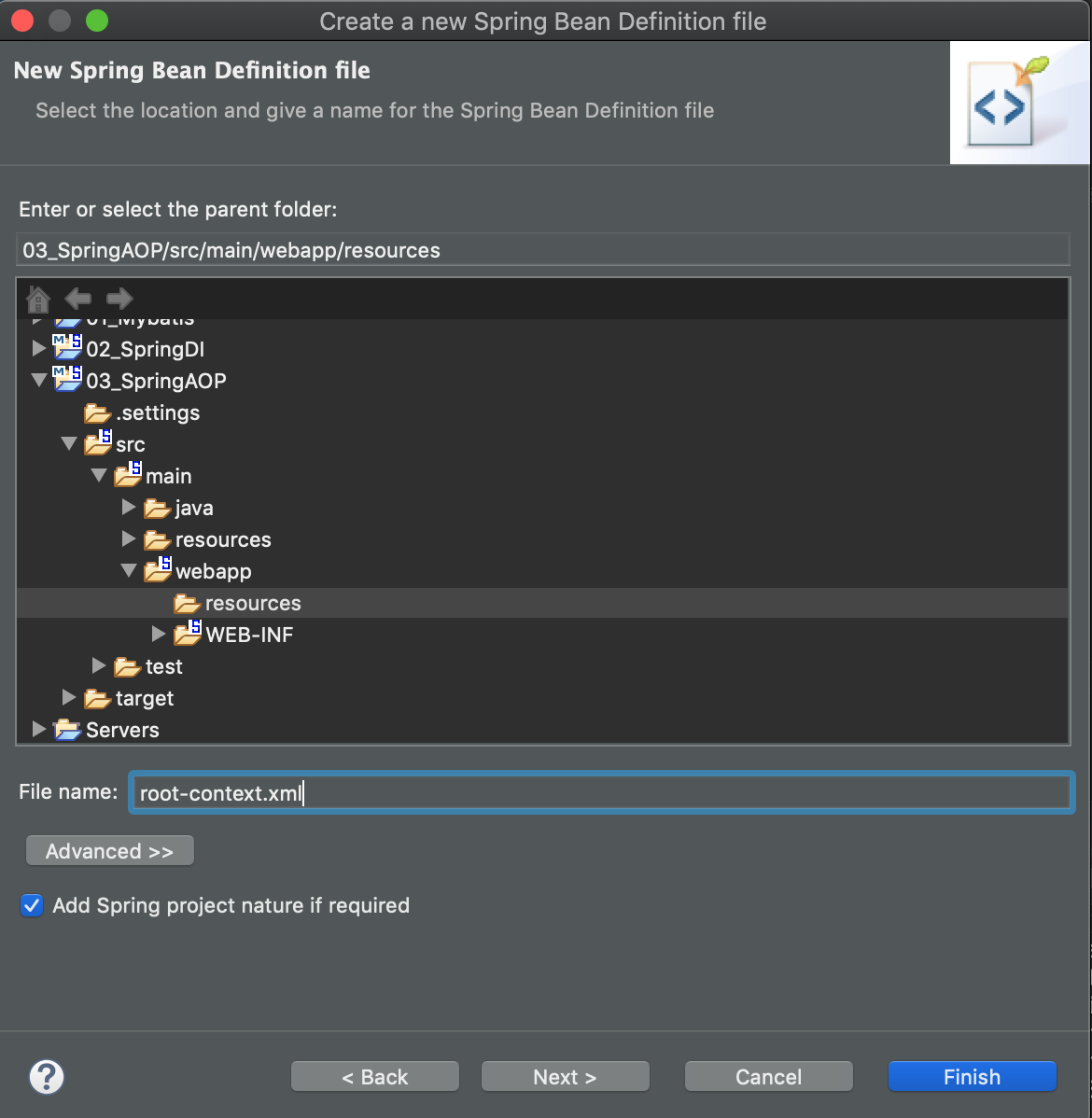
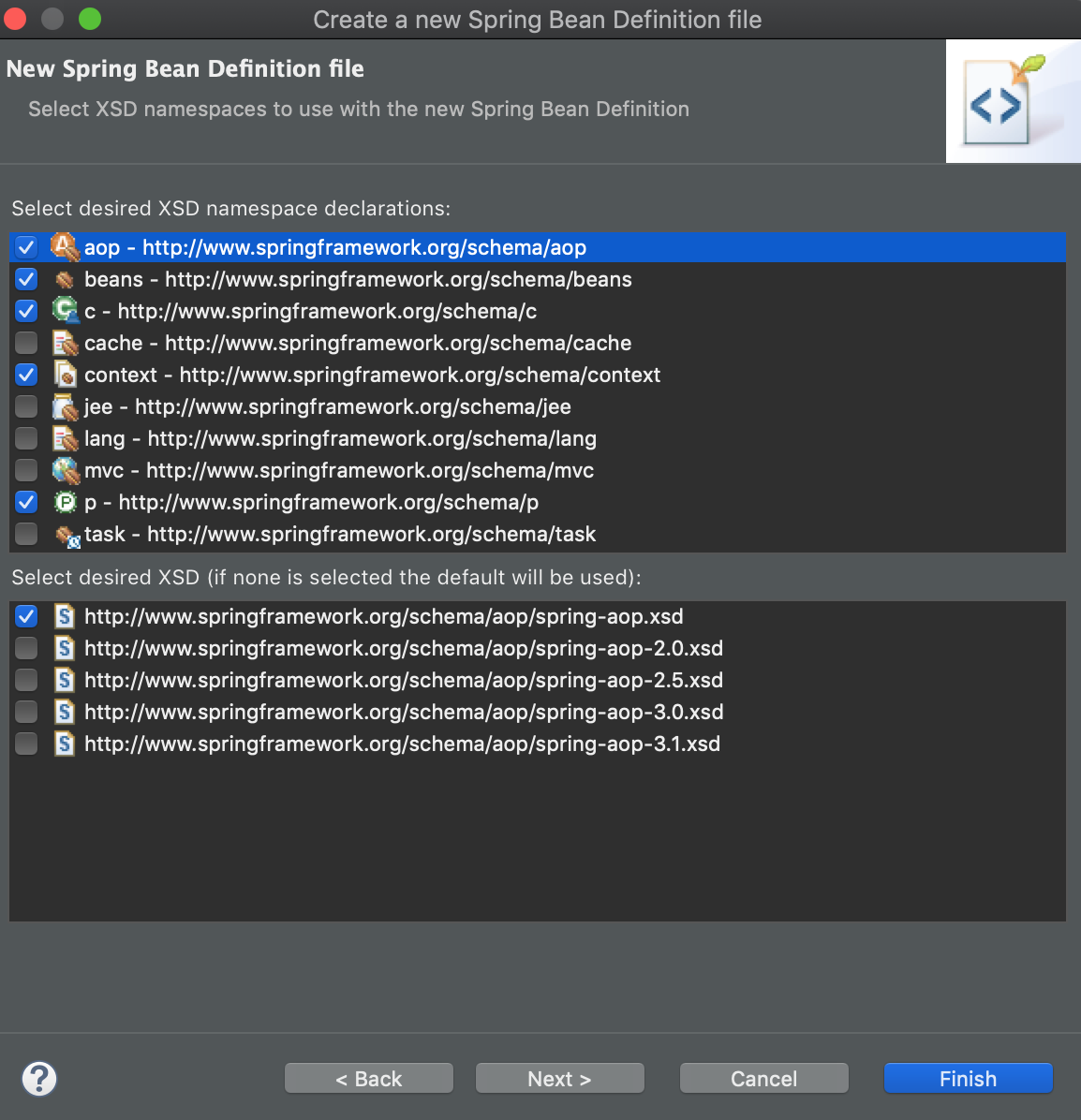
src -> main -> resources에 spring bean configuration File -> root-context.xml 파일 생성 -> beans, aop, context는 맨 위 버전 체크

캐릭터 테스트 생성
package com.kh.aop.character;

import org.junit.jupiter.api.Test;
import org.junit.jupiter.api.extension.ExtendWith;
import org.springframework.test.context.junit.jupiter.SpringExtension;
import org.springframework.test.context.ContextConfiguration;

@ExtendWith(SpringExtension.class)
@ContextConfiguration(locations = {"classpath:root-context.xml"})
class CharacterTest {

	@Test
	void test() {
	}

}
bean 생성
<?xml version="1.0" encoding="UTF-8"?>
<beans xmlns="http://www.springframework.org/schema/beans"
	xmlns:xsi="http://www.w3.org/2001/XMLSchema-instance"
	xmlns:aop="http://www.springframework.org/schema/aop"
	xmlns:c="http://www.springframework.org/schema/c"
	xmlns:context="http://www.springframework.org/schema/context"
	xmlns:p="http://www.springframework.org/schema/p"
	xsi:schemaLocation="http://www.springframework.org/schema/beans http://www.springframework.org/schema/beans/spring-beans.xsd
		http://www.springframework.org/schema/aop http://www.springframework.org/schema/aop/spring-aop.xsd
		http://www.springframework.org/schema/context http://www.springframework.org/schema/context/spring-context.xsd">


	<bean id="character" class="com.kh.aop.character.Character" p:name="동동이" p:level="100" p:weapon-ref="sword"/>

	<bean id="sword" class="com.kh.aop.weapon.Sword" p:name="강철검" />
</beans>
테스트 진행
package com.kh.aop.character;

import static org.assertj.core.api.Assertions.assertThat;

import org.junit.jupiter.api.Test;
import org.junit.jupiter.api.extension.ExtendWith;
import org.springframework.test.context.junit.jupiter.SpringExtension;
import org.springframework.beans.factory.annotation.Autowired;
import org.springframework.test.context.ContextConfiguration;

@ExtendWith(SpringExtension.class)
@ContextConfiguration(locations = {"classpath:root-context.xml"})
class CharacterTest {

	@Autowired
	private Character character;

	@Test
	void test() {
	}

	@Test
	void create() {
		System.out.println(character);

		assertThat(character).isNotNull();
		assertThat(character.getWeapon()).isNotNull();
	}

	@Test
	void questTest() {
		System.out.println(character.quest("일시점검"));

		assertThat(character.quest("일시점검")).contains("일시점검");
	}

}
AOP를 만들어서 quest메소드를 호출하기 전 로그를 찍는 작업을 진행
-> 로그를 직접 작성하지 않고, AOP활용
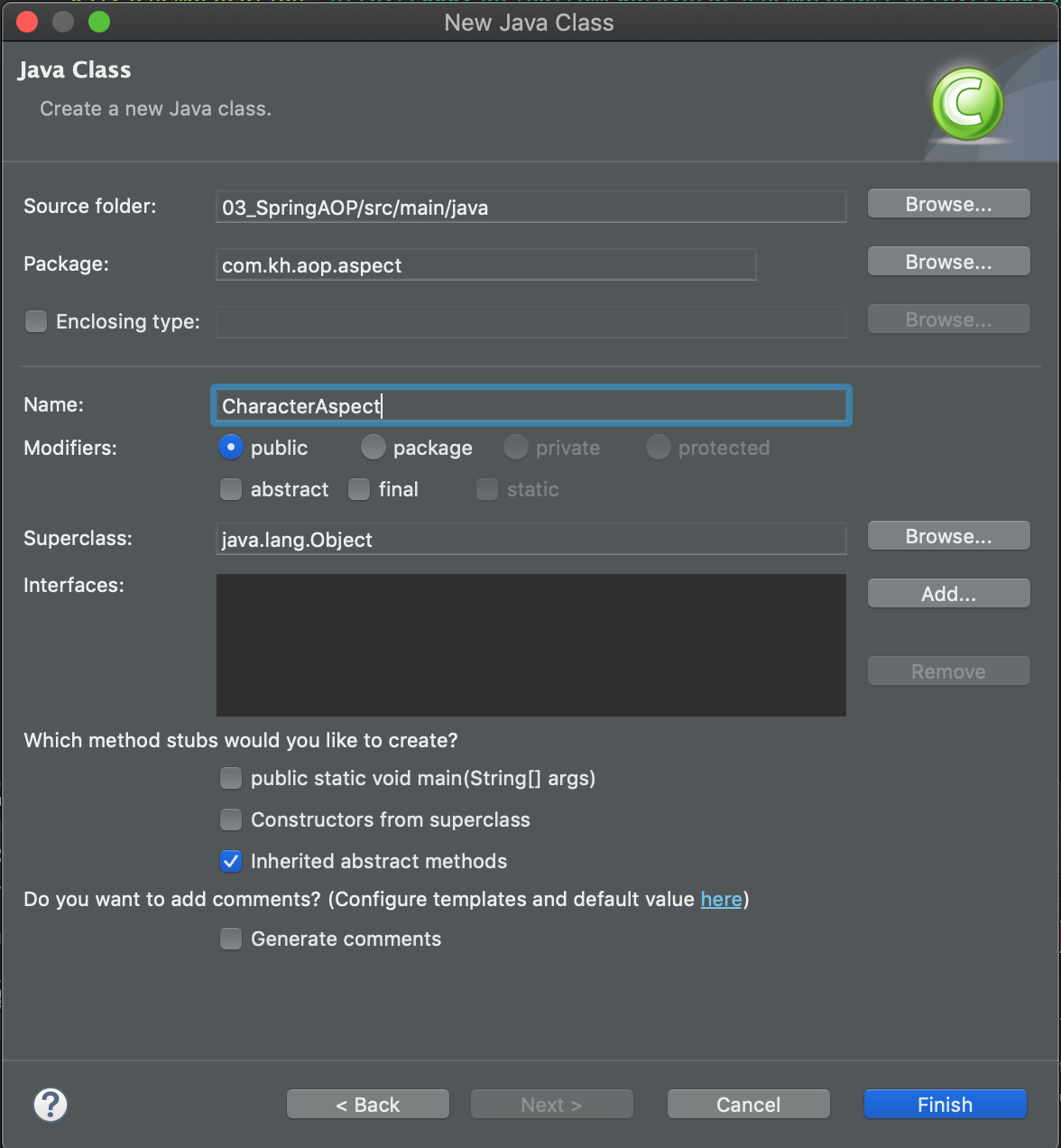
클래스 생성
package com.kh.aop.aspect;

public class CharacterAspect {

	// quest가 수행되기 전 찍을 내용
	public void beforeQuest() {
		System.out.println("퀘스트 준비중...");
	}


}
이 기능 자체를 advice라고 한다.
quest가 수행되기 전 찍을 내용 작성 후 root-context.xml에 bean으로 등록하면서 aspect도 작성해준다.
	<bean id="characterAspect" class="com.kh.aop.aspect.CharacterAspect" />

	<aop:config>
		<!-- bean id를 ref에 넘겨주면 bean이 aspect 객체가 된다. -->
		<aop:aspect ref="characterAspect">
			<aop:before
				pointcut="execution(* com.kh.aop.character.Character.quest(..))"
				method="beforeQuest"/>
		</aop:aspect>
	</aop:config>
해당하는 메소드(pointcut 내)가 실행될 때, method내에 있는 걸 실행시키겠다고 선언해줬다. (Joinpoint 지정)
전체 실습 코드
Spring DI
> src/main/java/com/kh/di/character/Character.java
package com.kh.di.character;

import org.springframework.beans.factory.annotation.Autowired;
import org.springframework.beans.factory.annotation.Qualifier;
import org.springframework.beans.factory.annotation.Value;
import org.springframework.context.annotation.PropertySource;
import org.springframework.core.env.Environment;
import org.springframework.stereotype.Component;

import com.kh.di.weapon.Weapon;

import lombok.Data;

@Data
// application context가 해당하는 클래스로 객체(bean)를 만들어서 application context에 보관한다.
// bean 생성 시 별도의 ID를 지정해주지 않으면 클래스 이름에서 앞글자를 소문자로 바꾼 값을 ID를 갖는다. (character)
@Component
// propertiySourse : classpath기준으로 properties파일의 경로를 입력해서 값을 읽어오는 방법
// 1. Environment 객체 사용
// 2. 스프링 프로퍼티 플레이스 홀더 사용 (${key:기본값})

//@PropertySource 어노테이션을 생략 후 properties 파일의 값을 읽어오는 방법
// 1. xml 설정 파일의 경우 <context:property-placeholder /> 추가
// 2. java 설정 파일의 경우
//@PropertySource("classpath:character.properties")
public class Character {

	// @Value를 통한 객체에 값 직접적으로 주입
//	@Value("제임스")
	// 2.스프링 프로퍼티 플레이스 홀더 사용
	@Value("${character.name}")
//	@Value("${character.name2:훈이}")
	private String name;

//	@Value("100")
	// 2.스프링 프로퍼티 플레이스 홀더 사용
	@Value("${character.level}")
//	@Value("${character.level:100}")
	private int level;

	@Autowired
	@Qualifier("eggBow")
	// 인터페이스
	private Weapon weapon;

	// 1. Environment 객체 사용
//	public Character(/*@Autowired*/ Environment env) {
//		this.name = env.getProperty("character.name");
//		this.level = Integer.parseInt(env.getProperty("character.level"));
//	}
}
> src/main/java/com/kh/di/config/OwnerConfig.java
package com.kh.di.config;

import org.springframework.beans.factory.annotation.Autowired;
import org.springframework.beans.factory.annotation.Qualifier;
import org.springframework.context.annotation.Bean;
import org.springframework.context.annotation.Configuration;

import com.kh.di.owner.Owner;
import com.kh.di.pet.Pet;

@Configuration
public class OwnerConfig {
	// Bean에 Id를 별도로 지정해주지 않으면 메소드명으로 Id를 지정한다. (owner)
	@Bean("mrhong")
	public Owner owner(@Autowired @Qualifier("dog") Pet pet) {
		// dog() 메소드는 빈으로 등록되어 있기 때문에 호출 시마다 객체를 생성하는 것이 아닌
		// 애플리케이션 컨텍스트에서 등록된 Bean 객체를 리턴한다.
		return new Owner("홍길동", 25, pet);
	}

	@Bean("dongdong")
	// Autowired는 생략 가능 : 현재 파일은 설정파일인데, 매개값으로 받는 객체가 있으면 application context상에 Pet 타입의 Bean이 있는지 확인
	// -> 있으면 주입해준다.
	// 만약 Qualifier를 생략해주고 싶다면 @Primary를 달아준다.
	public Owner owner2(@Autowired @Qualifier("kitty") Pet pet) {
		return new Owner("동동이", 30, pet);
	}
}
> src/main/java/com/kh/di/config/PetConfig.java
package com.kh.di.config;

import org.springframework.context.annotation.Bean;
import org.springframework.context.annotation.Configuration;

import com.kh.di.pet.Cat;
import com.kh.di.pet.Dog;

@Configuration
public class PetConfig {
	@Bean
	// Bean을 넘겨주기 위한 메소드
	public Dog dog() {
		// 리턴하는 객체를 생성자를 통해서 Bean으로 등록하게 됨
		return new Dog("댕댕이");
	}

	@Bean("kitty")
	// <bean primary="true" />와 같다.
//	@Primary
	public Cat cat() {
		Cat cat = new Cat();

		cat.setName("kitty");

		return cat;
	}
}
> src/main/java/com/kh/di/config/RootConfig.java
package com.kh.di.config;

import org.springframework.beans.factory.annotation.Autowired;
import org.springframework.beans.factory.annotation.Qualifier;
import org.springframework.context.annotation.Bean;
import org.springframework.context.annotation.ComponentScan;
import org.springframework.context.annotation.Configuration;
import org.springframework.context.annotation.Import;
import org.springframework.context.annotation.ImportResource;
import org.springframework.context.annotation.Primary;
import org.springframework.context.support.PropertySourcesPlaceholderConfigurer;
import org.springframework.core.io.ClassPathResource;
import org.springframework.core.io.Resource;

import com.kh.di.owner.Owner;
import com.kh.di.pet.Cat;
import com.kh.di.pet.Dog;
import com.kh.di.pet.Pet;

// Configuration이 추가 되어야만 해당 자바 클래스가 애플리케이션 컨텍스트의 설정파일이라고 선언한다고 볼 수 있다.
@Configuration
@Import(value = {
		OwnerConfig.class,
		PetConfig.class
		})
// component-scan과 같은 역할
@ComponentScan("com.kh.di")
// 참고용 : 자바에서 다른 설정 파일을 가져오고 싶을 때(XML) 사용
//@ImportResource(location = {"classpath"})
public class RootConfig {
	/*
	@Bean
	// Bean을 넘겨주기 위한 메소드
	public Dog dog() {
		// 리턴하는 객체를 생성자를 통해서 Bean으로 등록하게 됨
		return new Dog("댕댕이");
	}

  	// Bean에 Id를 별도로 지정해주지 않으면 메소드명으로 Id를 지정한다. (owner)
  	@Bean("mrhong")
	public Owner owner() {
		// dog() 메소드는 빈으로 등록되어 있기 때문에 호출 시마다 객체를 생성하는 것이 아닌
		// 애플리케이션 컨텍스트에서 등록된 Bean 객체를 리턴한다.
		return new Owner("홍길동", 25, dog());
	}
	*/

	@Bean
	public PropertySourcesPlaceholderConfigurer placeholderConfigurer() {
		PropertySourcesPlaceholderConfigurer configurer = new PropertySourcesPlaceholderConfigurer();

		Resource[] resources = new ClassPathResource[] {
				new ClassPathResource("character.properties"),
				new ClassPathResource("driver.properties")
		};

		configurer.setLocations(resources);

		return configurer;
	}

}
> src/main/java/com/kh/di/owner/Owner.java
package com.kh.di.owner;

import com.kh.di.pet.Cat;
import com.kh.di.pet.Dog;
import com.kh.di.pet.Pet;

import lombok.AllArgsConstructor;
import lombok.Data;
import lombok.NoArgsConstructor;

@Data
@AllArgsConstructor
@NoArgsConstructor
public class Owner {
	private String name;

	private int age;

	private Pet pet;


}
> src/main/java/com/kh/di/pet/Cat.java
package com.kh.di.pet;

import lombok.AllArgsConstructor;
import lombok.Data;
import lombok.NoArgsConstructor;

@Data
@AllArgsConstructor
@NoArgsConstructor
public class Cat implements Pet{
	private String name;

	@Override
	public String bark() {
		return "야옹~";
	}
}
> src/main/java/com/kh/di/pet/Dog.java
package com.kh.di.pet;

import lombok.AllArgsConstructor;
import lombok.Data;
import lombok.NoArgsConstructor;

@Data
@AllArgsConstructor
@NoArgsConstructor
public class Dog implements Pet{
	private String name;

	@Override
	public String bark() {
		return "멍멍!";
	}
}
> src/main/java/com/kh/di/pet/Pet.java
package com.kh.di.pet;

public interface Pet {
	// 추상 메소드 생성 (Cat, Dog 공통적으로 들어가는 메소드를 추상화 해줌)
	public String bark();
}
> src/main/java/com/kh/di/weapon/Bow.java
package com.kh.di.weapon;

import org.springframework.beans.factory.annotation.Value;
import org.springframework.stereotype.Component;

import lombok.AllArgsConstructor;
import lombok.Data;
import lombok.NoArgsConstructor;

@Data
@Component("eggBow")
public class Bow implements Weapon {
	@Value("에그")
	// 활에 대한 이름
	private String name;

	@Override
	public String attack() {

		return "활을 쏜다. 슉!";
	}
}
> src/main/java/com/kh/di/weapon/Sword.java
package com.kh.di.weapon;

import org.springframework.beans.factory.annotation.Value;
import org.springframework.context.annotation.Primary;
import org.springframework.stereotype.Component;

import lombok.AllArgsConstructor;
import lombok.Data;
import lombok.NoArgsConstructor;

@Data
// Primary : 동일한 타입의 bean이 여러 개 존재할 때 기본으로 주입될 빈을 지정한다.
@Primary
@Component
public class Sword implements Weapon {

	@Value("드래곤")
	// 칼(무기)에대한 이름
	private String name;

	@Override
	public String attack() {

		return "검을 휘두른다.";
	}

}
> src/main/java/com/kh/di/weapon/Weapon.java
package com.kh.di.weapon;

public interface Weapon {
	// 무기마다 공격 방식이 다르기 때문에 어떻게 공격할 것인지에 대한 설정 - 추상 메소드
	public String attack();
}
> src/main/resources/spring/owner-context.xml
<?xml version="1.0" encoding="UTF-8"?>
<beans xmlns="http://www.springframework.org/schema/beans"
	xmlns:xsi="http://www.w3.org/2001/XMLSchema-instance"
	xmlns:c="http://www.springframework.org/schema/c"
	xmlns:p="http://www.springframework.org/schema/p"
	xsi:schemaLocation="http://www.springframework.org/schema/beans http://www.springframework.org/schema/beans/spring-beans.xsd">

	<!--
	기존 방식 :
	Owner owner = new Owner("홍길동", 20, new Cat("나비"));

	 <bean id="owner" class="com.kh.di.owner.Owner">
	 	<constructor-arg name="name" value="홍길동" />
	 	<constructor-arg name="age" value="20" />
	 	<constructor-arg name="pet" ref="dog" />
	 </bean>

	 <bean>
	 * name 대신에 index를 사용해서 구분할 수도 있다.
	 <constructor-arg index="0" value="홍길동" />
 	 <constructor-arg index="1" value="20" />
 	 <constructor-arg index="2" ref="dog" />
 	 </bean>


	 <bean id="owner" class="com.kh.di.owner.Owner" c:_0="홍길동" c:_1="20" c:_2-ref="dog"/>
	 -->

	 <!-- <bean id="mrhong" primary="true" class="com.kh.di.owner.Owner" c:name="홍길동" c:age="20" c:pet-ref="cat"/> -->
	 <bean id="mrhong" class="com.kh.di.owner.Owner" c:name="홍길동" c:age="20" c:pet-ref="cat"/>
	 <bean id="dongdong" class="com.kh.di.owner.Owner" c:name="동동이" c:age="30" c:pet-ref="dog"/>

</beans>
> src/main/resources/spring/pet-context.xml
<?xml version="1.0" encoding="UTF-8"?>
<beans xmlns="http://www.springframework.org/schema/beans"
	xmlns:xsi="http://www.w3.org/2001/XMLSchema-instance"
	xmlns:c="http://www.springframework.org/schema/c"
	xmlns:p="http://www.springframework.org/schema/p"
	xsi:schemaLocation="http://www.springframework.org/schema/beans http://www.springframework.org/schema/beans/spring-beans.xsd">


	 <!--
	 	Pet pet = new Cat("나비")

	 <bean id="cat" class="com.kh.di.pet.Cat">
	 	<constructor-arg name="name" value="나비"/>
	 </bean>

	 	Pet pet = new Dog();

	 	pet.setName("댕댕이");

	 <bean id="dog" class="com.kh.di.pet.Dog">
	 	<property name="name" value="댕댕이"/>
	 </bean>
	  -->

	 <!-- 생성자의 매개값이 하나일 경우 아래와 같이 작성이 가능하다. -->
	 <bean id="cat" class="com.kh.di.pet.Cat" c:_="초롱이"/>
	 <bean id="dog" class="com.kh.di.pet.Dog" p:name="인절미" />

</beans>
> src/main/resources/spring/root-context.xml
<?xml version="1.0" encoding="UTF-8"?>
<beans xmlns="http://www.springframework.org/schema/beans"
	xmlns:xsi="http://www.w3.org/2001/XMLSchema-instance"
	xmlns:c="http://www.springframework.org/schema/c"
   	xmlns:p="http://www.springframework.org/schema/p"
	xmlns:context="http://www.springframework.org/schema/context"
  	xsi:schemaLocation="http://www.springframework.org/schema/beans http://www.springframework.org/schema/beans/spring-beans.xsd
    	http://www.springframework.org/schema/context http://www.springframework.org/schema/context/spring-context.xsd">

	<!-- Root Context: defines shared resources visible to all other web components -->

	<!-- 다른 설정 파일을 가져오기 위해 사용되는 태그 -->
	<import resource="owner-context.xml" />
	<import resource="pet-context.xml" />

	<!--
		베이스 패키지에 지정한 패키지부터 하위 패키지를 뒤지면서 @Component라는 어노테이션이 붙어있으면
		객체로 만들어서 application context에 bean으로 등록해준다.
	 -->
	<context:component-scan base-package="com.kh.di" />
	<context:property-placeholder location="classpath:character.properties,classpath:driver.properties" />

</beans>
> src/main/webapp/WEB-INF/spring/appServlet/servlet-context.xml
<?xml version="1.0" encoding="UTF-8"?>
<beans:beans xmlns="http://www.springframework.org/schema/mvc"
	xmlns:xsi="http://www.w3.org/2001/XMLSchema-instance"
	xmlns:beans="http://www.springframework.org/schema/beans"
	xmlns:context="http://www.springframework.org/schema/context"
	xsi:schemaLocation="http://www.springframework.org/schema/mvc https://www.springframework.org/schema/mvc/spring-mvc.xsd
		http://www.springframework.org/schema/beans https://www.springframework.org/schema/beans/spring-beans.xsd
		http://www.springframework.org/schema/context https://www.springframework.org/schema/context/spring-context.xsd">

	<!-- DispatcherServlet Context: defines this servlet's request-processing infrastructure -->

	<!-- Enables the Spring MVC @Controller programming model -->
	<annotation-driven />

	<!-- Handles HTTP GET requests for /resources/** by efficiently serving up static resources in the ${webappRoot}/resources directory -->
	<resources mapping="/resources/**" location="/resources/" />

	<!-- Resolves views selected for rendering by @Controllers to .jsp resources in the /WEB-INF/views directory -->
	<beans:bean class="org.springframework.web.servlet.view.InternalResourceViewResolver">
		<beans:property name="prefix" value="/WEB-INF/views/" />
		<beans:property name="suffix" value=".jsp" />
	</beans:bean>

	<context:component-scan base-package="com.kh.di" />


</beans:beans>
> src/main/webapp/WEB-INF/spring/root-context.xml
<?xml version="1.0" encoding="UTF-8"?>
<beans xmlns="http://www.springframework.org/schema/beans"
	xmlns:xsi="http://www.w3.org/2001/XMLSchema-instance"
	xsi:schemaLocation="http://www.springframework.org/schema/beans https://www.springframework.org/schema/beans/spring-beans.xsd">

	<!-- Root Context: defines shared resources visible to all other web components -->

</beans>
> src/main/webapp/WEB-INF/web.xml
<?xml version="1.0" encoding="UTF-8"?>
<web-app version="2.5" xmlns="http://java.sun.com/xml/ns/javaee"
	xmlns:xsi="http://www.w3.org/2001/XMLSchema-instance"
	xsi:schemaLocation="http://java.sun.com/xml/ns/javaee https://java.sun.com/xml/ns/javaee/web-app_2_5.xsd">

	<!-- The definition of the Root Spring Container shared by all Servlets and Filters -->
	<context-param>
		<param-name>contextConfigLocation</param-name>
		<param-value>/WEB-INF/spring/root-context.xml</param-value>
	</context-param>

	<!-- Creates the Spring Container shared by all Servlets and Filters -->
	<listener>
		<listener-class>org.springframework.web.context.ContextLoaderListener</listener-class>
	</listener>

	<!-- Processes application requests -->
	<servlet>
		<servlet-name>appServlet</servlet-name>
		<servlet-class>org.springframework.web.servlet.DispatcherServlet</servlet-class>
		<init-param>
			<param-name>contextConfigLocation</param-name>
			<param-value>/WEB-INF/spring/appServlet/servlet-context.xml</param-value>
		</init-param>
		<load-on-startup>1</load-on-startup>
	</servlet>

	<servlet-mapping>
		<servlet-name>appServlet</servlet-name>
		<url-pattern>/</url-pattern>
	</servlet-mapping>

	<!--
		UTF-8 인코딩 필터 등록
		: 필터를 직접 만들어서 등록해도 되지만, 스프링에서 인코딩 필터를 제공하고 있기 때문에 web.xml에 필터를 등록해 주기만 하면 된다.
	 -->
	<filter>
      <filter-name>encodingFilter</filter-name>
      <filter-class>org.springframework.web.filter.CharacterEncodingFilter</filter-class>
      <init-param>
         <param-name>encoding</param-name>
         <param-value>UTF-8</param-value>
      </init-param>
      <init-param>
         <param-name>forceEncoding</param-name>
         <param-value>true</param-value>
      </init-param>
   </filter>

   <filter-mapping>
      <filter-name>encodingFilter</filter-name>
      <url-pattern>/*</url-pattern>
   </filter-mapping>

</web-app>
> src/test/java/com/kh/di/character/CharacterTest.java
package com.kh.di.character;

import static org.assertj.core.api.Assertions.assertThat;

import org.junit.jupiter.api.Disabled;
import org.junit.jupiter.api.Test;
import org.junit.jupiter.api.extension.ExtendWith;
import org.springframework.beans.factory.annotation.Autowired;
import org.springframework.beans.factory.annotation.Value;
import org.springframework.test.context.ContextConfiguration;
import org.springframework.test.context.junit.jupiter.SpringExtension;

import com.kh.di.config.RootConfig;

@ExtendWith(SpringExtension.class)
// 설정파일 지정
//@ContextConfiguration(locations = "classpath:spring/root-context.xml")
// 자바 설정으로 바꾼다면?
@ContextConfiguration(classes = RootConfig.class)
class CharacterTest {

	// required 속성은 bean 주입이 필수로 진행되어야 하는 지 설정하는 옵션이다.
	// required가 true일 경우 주입해야 되는 bean이 application context에 존재하지 않으면 Exception이 발생한다. (default)
	// required가 false일 경우 주입해야 되는 bean이 application context에 존재하지 않으면 null을 주입한다.
	@Autowired(required = false)
	// application context에게 주입받을 character
	private Character character;

	@Value("${character.name}")
	private String name;

	@Value("${character.level}")
	private int level;

	@Value("${db.driver}")
	private String driver;

	@Value("${db.url}")
	private String url;

	@Test
//	@Disabled
	public void test() {
		assertThat(driver).isNotNull().isEqualTo("oracle.jdbc.driver.OracleDriver");
		assertThat(url).isNotNull().isEqualTo("jdbc:oracle:thin:@localhost:1521:xe");
	}

	@Test
	public void create() {
		System.out.println(character);

		assertThat(character).isNotNull();
		assertThat(character.getName()).isNotNull().isEqualTo(name);
		assertThat(character.getLevel()).isPositive().isGreaterThan(0).isEqualTo(level);
		assertThat(character.getWeapon()).isNotNull();
	}
}
> src/test/java/com/kh/di/owner/OwnerTest.java
package com.kh.di.owner;

import static org.assertj.core.api.Assertions.assertThat;
import static org.junit.jupiter.api.Assertions.*;

import org.junit.jupiter.api.BeforeEach;
import org.junit.jupiter.api.Disabled;
import org.junit.jupiter.api.Test;
import org.junit.jupiter.api.extension.ExtendWith;
import org.springframework.beans.factory.annotation.Autowired;
import org.springframework.beans.factory.annotation.Qualifier;
import org.springframework.context.ApplicationContext;
import org.springframework.context.annotation.AnnotationConfigApplicationContext;
import org.springframework.context.support.GenericXmlApplicationContext;
import org.springframework.test.context.ContextConfiguration;
import org.springframework.test.context.junit.jupiter.SpringExtension;

import com.kh.di.config.OwnerConfig;
import com.kh.di.config.PetConfig;
import com.kh.di.config.RootConfig;
import com.kh.di.pet.Cat;
import com.kh.di.pet.Dog;

// JUnit에서 스프링을 사용할 수 있도록 SpringExtension.class를 사용하여 기능을 확장한다.
// 해당 설정이 있어야 @ContextConfiguration()을 통해서 설정 파일을 고, 애플리케이션 컨텍스트를 생성할 수 있다.
@ExtendWith(SpringExtension.class)
//@ContextConfiguration(locations = {"classpath:spring/root-context.xml"})
@ContextConfiguration(classes = {RootConfig.class})
//@ContextConfiguration(classes = {
//				OwnerConfig.class,
//				PetConfig.class
//				})
class OwnerTest {

	// 애플리케이션 컨텍스트 상에서 클래스 타입과 일치하는 빈을 자동으로 주입시켜준다.
	// 이 때 동일한 클래스 타입에 빈이 여러 개 존재할 경우 @Qualifier("bean ID")를 명시적으로 넣어주어야 한다.
	// 직접적으로 @QUalifier를 주지 않고도 애플리케이션 컨텍스트 상에서 겹치는 타입의 빈이 여러 개 있을 때 primary="true"로 기본 빈을 지정할 수 있다.
	// -> owner-context.xml에서 확인 가능
	@Autowired
	@Qualifier("dongdong")
	// 가져오려는 객체 : 아무것도 안 넣어주면 null이 들어감 (JVM에서 기본적으로 넣어줌)
	private Owner owner;

	@Test
	@Disabled
	public void nothing() {
	}

	@Test
	public void create() {
		// 기존에 자바 애플리케이션에서는 다형성과 생성자 주입을 통해 객체간의 결합을 느슨하게 만들어 준다.
		Owner owner = new Owner("홍길동", 20, new Cat("나비"));

		assertThat(owner).isNotNull();
		assertThat(owner.getPet()).isNotNull();
	}

	// 애플리케이션 컨텍스트를 통해 객체를 가져오기
	@Test
	public void contextTest() {
		// 스프링의 애플리케이션 컨텍스트를 활용하여 객체 간의 결합을 더욱 느슨하게 만들어준다.
		// new GenericXmlApplicationContext(클래스패스 상의 xml 파일의 위치 지정");
		ApplicationContext context =
//				new GenericXmlApplicationContext("spring/root-context.xml");
//				new GenericXmlApplicationContext("classpath:spring/root-context.xml");
//				new GenericXmlApplicationContext("file:src/main/resources/spring/root-context.xml");
//				new GenericXmlApplicationContext("spring/owner-context.xml", "spring/pet-context.xml");
				// 설정 파일로 쓸 자바 파일을 명시해주면 된다.
				new AnnotationConfigApplicationContext(RootConfig.class);


		// object로 가져온 후 형변환
//		Owner owner = (Owner) context.getBean("owner");
		// 두 번째 매개값에 bean을 가져올 때 변환해서 가져올 타입 명시
//		Owner owner = context.getBean("owner", Owner.class);
		Owner owner = context.getBean("dongdong", Owner.class);

		assertThat(owner).isNotNull();
		assertThat(owner.getPet()).isNotNull();
	}

	@Test
	public void autoWiredTest() {
		assertThat(owner).isNotNull();
		assertThat(owner.getPet()).isNotNull();
		assertThat(owner.getPet().bark()).isNotNull().isEqualTo("야옹~");
	}

}
> 02_SpringDI/pom.xml
<?xml version="1.0" encoding="UTF-8"?>
<project xmlns="http://maven.apache.org/POM/4.0.0" xmlns:xsi="http://www.w3.org/2001/XMLSchema-instance"
	xsi:schemaLocation="http://maven.apache.org/POM/4.0.0 https://maven.apache.org/maven-v4_0_0.xsd">
	<modelVersion>4.0.0</modelVersion>
	<groupId>com.kh</groupId>
	<artifactId>di</artifactId>
	<name>02_SpringDI</name>
	<packaging>war</packaging>
	<version>1.0.0-BUILD-SNAPSHOT</version>
	<properties>
		<!-- 자바 버전 및 스프링 프레임워크 버전을 변경 -->
		<java-version>11</java-version>
		<org.springframework-version>5.3.15</org.springframework-version>
		<org.aspectj-version>1.6.10</org.aspectj-version>
		<org.slf4j-version>1.6.6</org.slf4j-version>
	</properties>
	<dependencies>
		<!-- Spring -->
		<dependency>
			<groupId>org.springframework</groupId>
			<artifactId>spring-context</artifactId>
			<version>${org.springframework-version}</version>
			<exclusions>
				<!-- Exclude Commons Logging in favor of SLF4j -->
				<exclusion>
					<groupId>commons-logging</groupId>
					<artifactId>commons-logging</artifactId>
				 </exclusion>
			</exclusions>
		</dependency>
		<dependency>
			<groupId>org.springframework</groupId>
			<artifactId>spring-webmvc</artifactId>
			<version>${org.springframework-version}</version>
		</dependency>

		<dependency>
		    <groupId>org.springframework</groupId>
		    <artifactId>spring-test</artifactId>
		    <version>${org.springframework-version}</version>
		    <scope>test</scope>
		</dependency>

		<!-- AspectJ -->
		<dependency>
			<groupId>org.aspectj</groupId>
			<artifactId>aspectjrt</artifactId>
			<version>${org.aspectj-version}</version>
		</dependency>

		<!-- Logging -->
		<dependency>
			<groupId>org.slf4j</groupId>
			<artifactId>slf4j-api</artifactId>
			<version>${org.slf4j-version}</version>
		</dependency>
		<dependency>
			<groupId>org.slf4j</groupId>
			<artifactId>jcl-over-slf4j</artifactId>
			<version>${org.slf4j-version}</version>
			<scope>runtime</scope>
		</dependency>
		<dependency>
			<groupId>org.slf4j</groupId>
			<artifactId>slf4j-log4j12</artifactId>
			<version>${org.slf4j-version}</version>
			<scope>runtime</scope>
		</dependency>
		<dependency>
			<groupId>log4j</groupId>
			<artifactId>log4j</artifactId>
			<version>1.2.15</version>
			<exclusions>
				<exclusion>
					<groupId>javax.mail</groupId>
					<artifactId>mail</artifactId>
				</exclusion>
				<exclusion>
					<groupId>javax.jms</groupId>
					<artifactId>jms</artifactId>
				</exclusion>
				<exclusion>
					<groupId>com.sun.jdmk</groupId>
					<artifactId>jmxtools</artifactId>
				</exclusion>
				<exclusion>
					<groupId>com.sun.jmx</groupId>
					<artifactId>jmxri</artifactId>
				</exclusion>
			</exclusions>
			<scope>runtime</scope>
		</dependency>

		<!-- @Inject -->
		<dependency>
			<groupId>javax.inject</groupId>
			<artifactId>javax.inject</artifactId>
			<version>1</version>
		</dependency>

		<!-- Servlet -->
		<dependency>
		    <groupId>javax.servlet</groupId>
		    <artifactId>javax.servlet-api</artifactId>
		    <version>4.0.1</version>
		    <scope>provided</scope>
		</dependency>

		<dependency>
		    <groupId>javax.servlet</groupId>
		    <artifactId>javax.servlet-api</artifactId>
		    <version>4.0.1</version>
		    <scope>provided</scope>
		</dependency>

		<!-- JSTL -->
		<dependency>
		    <groupId>org.apache.taglibs</groupId>
		    <artifactId>taglibs-standard-impl</artifactId>
		    <version>1.2.5</version>
		</dependency>

		<dependency>
		    <groupId>org.apache.taglibs</groupId>
		    <artifactId>taglibs-standard-spec</artifactId>
		    <version>1.2.5</version>
		</dependency>

		<dependency>
		    <groupId>org.apache.taglibs</groupId>
		    <artifactId>taglibs-standard-jstlel</artifactId>
		    <version>1.2.5</version>
		</dependency>

		<dependency>
		    <groupId>org.apache.taglibs</groupId>
		    <artifactId>taglibs-standard-compat</artifactId>
		    <version>1.2.5</version>
		</dependency>

		<!-- lombok 라이브러리 -->
	    <!-- https://mvnrepository.com/artifact/org.projectlombok/lombok -->
		<dependency>
		    <groupId>org.projectlombok</groupId>
		    <artifactId>lombok</artifactId>
		    <version>1.18.22</version>
		    <!-- scope : 라이브러리가 실행될 시점 설정 / provided : 컴파일할 때만 사용되며, 배포시에는 사용되지 않음 -->
		    <scope>provided</scope>
		</dependency>

		<!-- Test 관련 라이브러리 -->
		<!-- https://mvnrepository.com/artifact/org.junit.jupiter/junit-jupiter-api -->
		<dependency>
		    <groupId>org.junit.jupiter</groupId>
		    <artifactId>junit-jupiter-api</artifactId>
		    <version>5.8.2</version>
		    <scope>test</scope>
		</dependency>

		<!-- https://mvnrepository.com/artifact/org.junit.jupiter/junit-jupiter-params -->
		<dependency>
		    <groupId>org.junit.jupiter</groupId>
		    <artifactId>junit-jupiter-params</artifactId>
		    <version>5.8.2</version>
		    <scope>test</scope>
		</dependency>

		<!-- 테스트를 더 효율적으로 검증할 수 있는 관련 라이브러러 -->
		<!-- https://mvnrepository.com/artifact/org.assertj/assertj-core -->
		<dependency>
		    <groupId>org.assertj</groupId>
		    <artifactId>assertj-core</artifactId>
		    <version>3.21.0</version>
		    <scope>test</scope>
		</dependency>
	</dependencies>
    <build>
        <plugins>
            <plugin>
                <artifactId>maven-eclipse-plugin</artifactId>
                <version>2.10</version>
                <configuration>
                    <additionalProjectnatures>
                        <projectnature>org.springframework.ide.eclipse.core.springnature</projectnature>
                    </additionalProjectnatures>
                    <additionalBuildcommands>
                        <buildcommand>org.springframework.ide.eclipse.core.springbuilder</buildcommand>
                    </additionalBuildcommands>
                    <downloadSources>true</downloadSources>
                    <downloadJavadocs>true</downloadJavadocs>
                </configuration>
            </plugin>
            <plugin>
                <groupId>org.apache.maven.plugins</groupId>
                <artifactId>maven-compiler-plugin</artifactId>
                <version>3.8.1</version>
                <configuration>
                    <source>${java-version}</source>
                    <target>${java-version}</target>
                    <compilerArgument>-Xlint:all</compilerArgument>
                    <showWarnings>true</showWarnings>
                    <showDeprecation>true</showDeprecation>
                </configuration>
            </plugin>
            <plugin>
                <groupId>org.codehaus.mojo</groupId>
                <artifactId>exec-maven-plugin</artifactId>
                <version>1.2.1</version>
                <configuration>
                    <mainClass>org.test.int1.Main</mainClass>
                </configuration>
            </plugin>
        </plugins>
    </build>
</project>
Spring AOP
> 03_SpringAOP/pom.xml
<?xml version="1.0" encoding="UTF-8"?>
<project xmlns="http://maven.apache.org/POM/4.0.0" xmlns:xsi="http://www.w3.org/2001/XMLSchema-instance"
	xsi:schemaLocation="http://maven.apache.org/POM/4.0.0 https://maven.apache.org/maven-v4_0_0.xsd">
	<modelVersion>4.0.0</modelVersion>
	<groupId>com.kh</groupId>
	<artifactId>aop</artifactId>
	<name>03_SpringAOP</name>
	<packaging>war</packaging>
	<version>1.0.0-BUILD-SNAPSHOT</version>
	<properties>
		<java-version>11</java-version>
		<org.springframework-version>5.3.14</org.springframework-version>
		<org.aspectj-version>1.9.7</org.aspectj-version>
		<org.slf4j-version>1.6.6</org.slf4j-version>
	</properties>
	<dependencies>
		<!-- Spring -->
		<dependency>
			<groupId>org.springframework</groupId>
			<artifactId>spring-context</artifactId>
			<version>${org.springframework-version}</version>
			<exclusions>
				<!-- Exclude Commons Logging in favor of SLF4j -->
				<exclusion>
					<groupId>commons-logging</groupId>
					<artifactId>commons-logging</artifactId>
				 </exclusion>
			</exclusions>
		</dependency>

		<dependency>
			<groupId>org.springframework</groupId>
			<artifactId>spring-webmvc</artifactId>
			<version>${org.springframework-version}</version>
		</dependency>

		<dependency>
		    <groupId>org.springframework</groupId>
		    <artifactId>spring-test</artifactId>
		    <version>${org.springframework-version}</version>
		    <scope>test</scope>
		</dependency>

		<!-- AspectJ -->
		<dependency>
			<groupId>org.aspectj</groupId>
			<artifactId>aspectjrt</artifactId>
			<version>${org.aspectj-version}</version>
		</dependency>

      	<dependency>
          <groupId>org.aspectj</groupId>
          <artifactId>aspectjweaver</artifactId>
          <version>${org.aspectj-version}</version>
      	</dependency>

		<!-- Logging -->
		<dependency>
			<groupId>org.slf4j</groupId>
			<artifactId>slf4j-api</artifactId>
			<version>${org.slf4j-version}</version>
		</dependency>
		<dependency>
			<groupId>org.slf4j</groupId>
			<artifactId>jcl-over-slf4j</artifactId>
			<version>${org.slf4j-version}</version>
			<scope>runtime</scope>
		</dependency>
		<dependency>
			<groupId>org.slf4j</groupId>
			<artifactId>slf4j-log4j12</artifactId>
			<version>${org.slf4j-version}</version>
			<scope>runtime</scope>
		</dependency>
		<dependency>
			<groupId>log4j</groupId>
			<artifactId>log4j</artifactId>
			<version>1.2.15</version>
			<exclusions>
				<exclusion>
					<groupId>javax.mail</groupId>
					<artifactId>mail</artifactId>
				</exclusion>
				<exclusion>
					<groupId>javax.jms</groupId>
					<artifactId>jms</artifactId>
				</exclusion>
				<exclusion>
					<groupId>com.sun.jdmk</groupId>
					<artifactId>jmxtools</artifactId>
				</exclusion>
				<exclusion>
					<groupId>com.sun.jmx</groupId>
					<artifactId>jmxri</artifactId>
				</exclusion>
			</exclusions>
			<scope>runtime</scope>
		</dependency>

		<!-- @Inject -->
		<dependency>
			<groupId>javax.inject</groupId>
			<artifactId>javax.inject</artifactId>
			<version>1</version>
		</dependency>

		<!-- Servlet -->
		<dependency>
		    <groupId>javax.servlet</groupId>
		    <artifactId>javax.servlet-api</artifactId>
		    <version>4.0.1</version>
		    <scope>provided</scope>
		</dependency>

		<dependency>
		    <groupId>javax.servlet.jsp</groupId>
		    <artifactId>javax.servlet.jsp-api</artifactId>
		    <version>2.3.3</version>
		    <scope>provided</scope>
		</dependency>

		<!-- JSTL -->
		<dependency>
		    <groupId>org.apache.taglibs</groupId>
		    <artifactId>taglibs-standard-impl</artifactId>
		    <version>1.2.5</version>
		</dependency>

		<dependency>
		    <groupId>org.apache.taglibs</groupId>
		    <artifactId>taglibs-standard-spec</artifactId>
		    <version>1.2.5</version>
		</dependency>

		<dependency>
		    <groupId>org.apache.taglibs</groupId>
		    <artifactId>taglibs-standard-jstlel</artifactId>
		    <version>1.2.5</version>
		</dependency>

		<dependency>
		    <groupId>org.apache.taglibs</groupId>
		    <artifactId>taglibs-standard-compat</artifactId>
		    <version>1.2.5</version>
		</dependency>

		<!-- lombok 라이브러리 -->
		<dependency>
		    <groupId>org.projectlombok</groupId>
		    <artifactId>lombok</artifactId>
		    <version>1.18.22</version>
		    <scope>provided</scope>
		</dependency>

		<!-- Test -->
		<dependency>
		    <groupId>org.junit.jupiter</groupId>
		    <artifactId>junit-jupiter-api</artifactId>
		    <version>5.8.2</version>
		    <scope>test</scope>
		</dependency>

		<dependency>
		    <groupId>org.junit.jupiter</groupId>
		    <artifactId>junit-jupiter-params</artifactId>
		    <version>5.8.2</version>
		    <scope>test</scope>
		</dependency>

		<dependency>
		    <groupId>org.assertj</groupId>
		    <artifactId>assertj-core</artifactId>
		    <version>3.21.0</version>
		    <scope>test</scope>
		</dependency>
	</dependencies>
    <build>
        <plugins>
            <plugin>
                <artifactId>maven-eclipse-plugin</artifactId>
                <version>2.10</version>
                <configuration>
                    <additionalProjectnatures>
                        <projectnature>org.springframework.ide.eclipse.core.springnature</projectnature>
                    </additionalProjectnatures>
                    <additionalBuildcommands>
                        <buildcommand>org.springframework.ide.eclipse.core.springbuilder</buildcommand>
                    </additionalBuildcommands>
                    <downloadSources>true</downloadSources>
                    <downloadJavadocs>true</downloadJavadocs>
                </configuration>
            </plugin>
            <plugin>
                <groupId>org.apache.maven.plugins</groupId>
                <artifactId>maven-compiler-plugin</artifactId>
                <version>3.8.1</version>
                <configuration>
                    <source>${java-version}</source>
                    <target>${java-version}</target>
                    <compilerArgument>-Xlint:all</compilerArgument>
                    <showWarnings>true</showWarnings>
                    <showDeprecation>true</showDeprecation>
                </configuration>
            </plugin>
            <plugin>
                <groupId>org.codehaus.mojo</groupId>
                <artifactId>exec-maven-plugin</artifactId>
                <version>1.2.1</version>
                <configuration>
                    <mainClass>org.test.int1.Main</mainClass>
                </configuration>
            </plugin>
        </plugins>
    </build>
</project>
> src/main/java/com/kh/aop/aspect/CharacterAspect.java
package com.kh.aop.aspect;

public class CharacterAspect {

	// quest가 수행되기 전 찍을 내용
	public void beforeQuest() {
		System.out.println("퀘스트 준비중...");
	}
}
> src/main/java/com/kh/aop/character/Character.java
package com.kh.aop.character;

import com.kh.aop.weapon.Weapon;

import lombok.Data;

@Data
public class Character {
	private String name;

	private int level;

	private Weapon weapon;

	public String quest(String questName) {

		return questName + " 퀘스트 진행 중";
	}
}
> src/main/java/com/kh/aop/weapon/Bow.java
package com.kh.aop.weapon;

import lombok.Data;

@Data
public class Bow implements Weapon {

	private String name;

	@Override
	public String attack() {

		return "활을 쏜다. 슉!";
	}
}
> src/main/java/com/kh/aop/weapon/Sword.java
package com.kh.aop.weapon;

import lombok.Data;

@Data
public class Sword implements Weapon {

	private String name;

	@Override
	public String attack() {

		return "검을 휘두른다.";
	}

}
> src/main/java/com/kh/aop/weapon/Weapon.java
package com.kh.aop.weapon;

public interface Weapon {
	// 무기마다 공격 방식이 다르기 때문에 어떻게 공격할 것인지에 대한 설정 - 추상 메소드
	public String attack();
}
> src/main/resources/root-context.xml
<?xml version="1.0" encoding="UTF-8"?>
<beans xmlns="http://www.springframework.org/schema/beans"
	xmlns:xsi="http://www.w3.org/2001/XMLSchema-instance"
	xmlns:aop="http://www.springframework.org/schema/aop"
	xmlns:c="http://www.springframework.org/schema/c"
	xmlns:context="http://www.springframework.org/schema/context"
	xmlns:p="http://www.springframework.org/schema/p"
	xsi:schemaLocation="http://www.springframework.org/schema/beans http://www.springframework.org/schema/beans/spring-beans.xsd
		http://www.springframework.org/schema/aop http://www.springframework.org/schema/aop/spring-aop.xsd
		http://www.springframework.org/schema/context http://www.springframework.org/schema/context/spring-context.xsd">

	<bean id="character" class="com.kh.aop.character.Character" p:name="동동이" p:level="100" p:weapon-ref="sword"/>

	<bean id="sword" class="com.kh.aop.weapon.Sword" p:name="강철검"/>

	<bean id="characterAspect" class="com.kh.aop.aspect.CharacterAspect"/>

	<aop:config>
		<aop:aspect ref="characterAspect">
			<aop:before
				pointcut="execution(* com.kh.aop.character.Character.quest(..))"
				method="beforeQuest"/>
		</aop:aspect>
	</aop:config>
</beans>
> src/main/webapp/WEB-INF/spring/appServlet/servlet-context.xml
<?xml version="1.0" encoding="UTF-8"?>
<beans:beans xmlns="http://www.springframework.org/schema/mvc"
	xmlns:xsi="http://www.w3.org/2001/XMLSchema-instance"
	xmlns:beans="http://www.springframework.org/schema/beans"
	xmlns:context="http://www.springframework.org/schema/context"
	xsi:schemaLocation="http://www.springframework.org/schema/mvc https://www.springframework.org/schema/mvc/spring-mvc.xsd
		http://www.springframework.org/schema/beans https://www.springframework.org/schema/beans/spring-beans.xsd
		http://www.springframework.org/schema/context https://www.springframework.org/schema/context/spring-context.xsd">

	<!-- DispatcherServlet Context: defines this servlet's request-processing infrastructure -->

	<!-- Enables the Spring MVC @Controller programming model -->
	<annotation-driven />

	<!-- Handles HTTP GET requests for /resources/** by efficiently serving up static resources in the ${webappRoot}/resources directory -->
	<resources mapping="/resources/**" location="/resources/" />

	<!-- Resolves views selected for rendering by @Controllers to .jsp resources in the /WEB-INF/views directory -->
	<beans:bean class="org.springframework.web.servlet.view.InternalResourceViewResolver">
		<beans:property name="prefix" value="/WEB-INF/views/" />
		<beans:property name="suffix" value=".jsp" />
	</beans:bean>

	<context:component-scan base-package="com.kh.aop" />


</beans:beans>
> src/main/webapp/WEB-INF/spring/root-context.xml
<?xml version="1.0" encoding="UTF-8"?>
<beans xmlns="http://www.springframework.org/schema/beans"
	xmlns:xsi="http://www.w3.org/2001/XMLSchema-instance"
	xsi:schemaLocation="http://www.springframework.org/schema/beans https://www.springframework.org/schema/beans/spring-beans.xsd">

	<!-- Root Context: defines shared resources visible to all other web components -->

</beans>
> src/main/webapp/WEB-INF/web.xml
<?xml version="1.0" encoding="UTF-8"?>
<web-app version="2.5" xmlns="http://java.sun.com/xml/ns/javaee"
	xmlns:xsi="http://www.w3.org/2001/XMLSchema-instance"
	xsi:schemaLocation="http://java.sun.com/xml/ns/javaee https://java.sun.com/xml/ns/javaee/web-app_2_5.xsd">

	<!-- The definition of the Root Spring Container shared by all Servlets and Filters -->
	<context-param>
		<param-name>contextConfigLocation</param-name>
		<param-value>/WEB-INF/spring/root-context.xml</param-value>
	</context-param>

	<!-- Creates the Spring Container shared by all Servlets and Filters -->
	<listener>
		<listener-class>org.springframework.web.context.ContextLoaderListener</listener-class>
	</listener>

	<!-- Processes application requests -->
	<servlet>
		<servlet-name>appServlet</servlet-name>
		<servlet-class>org.springframework.web.servlet.DispatcherServlet</servlet-class>
		<init-param>
			<param-name>contextConfigLocation</param-name>
			<param-value>/WEB-INF/spring/appServlet/servlet-context.xml</param-value>
		</init-param>
		<load-on-startup>1</load-on-startup>
	</servlet>

	<servlet-mapping>
		<servlet-name>appServlet</servlet-name>
		<url-pattern>/</url-pattern>
	</servlet-mapping>

	<filter>
		<filter-name>encodingFilter</filter-name>
		<filter-class>org.springframework.web.filter.CharacterEncodingFilter</filter-class>
		<init-param>
			<param-name>encoding</param-name>
			<param-value>UTF-8</param-value>
		</init-param>
		<init-param>
			<param-name>forceEncoding</param-name>
			<param-value>true</param-value>
		</init-param>
	</filter>
	<filter-mapping>
		<filter-name>encodingFilter</filter-name>
		<url-pattern>/*</url-pattern>
	</filter-mapping>
</web-app>
> src/test/java/com/kh/aop/character/CharacterTest.java
package com.kh.aop.character;

import static org.assertj.core.api.Assertions.assertThat;

import org.junit.jupiter.api.Test;
import org.junit.jupiter.api.extension.ExtendWith;
import org.springframework.beans.factory.annotation.Autowired;
import org.springframework.test.context.ContextConfiguration;
import org.springframework.test.context.junit.jupiter.SpringExtension;

@ExtendWith(SpringExtension.class)
@ContextConfiguration(locations = {"classpath:root-context.xml"})
class CharacterTest {
	@Autowired
	private Character character;

	@Test
	void test() {
	}

	@Test
	void create() {
		System.out.println(character);

		assertThat(character).isNotNull();
		assertThat(character.getWeapon()).isNotNull();
	}

	@Test
	void questTest() {
		System.out.println(character.quest("강철검"));

//		assertThat(character.quest("강철검")).contains("강철검");
	}
}'국비지원_Java > Java Programming_2' 카테고리의 다른 글
| 자바 프로그래밍_Day_106_Spring AOP / Annotation (0) | 2022.02.07 |
|---|---|
| 자바 프로그래밍_Day_105_Spring AOP (0) | 2022.02.02 |
| 자바 프로그래밍_Day_103_Spring DI (0) | 2022.01.27 |
| 자바 프로그래밍_Day_102_인터페이스 구현 평가 (0) | 2022.01.21 |
| 자바 프로그래밍_Day_101_스프링 개요 (0) | 2022.01.21 |


